




Specifications
Design
| Product brand | Clipsal |
|---|---|
| Range | Wiser |
| Product or component type | connected dimmer |
| Device application | light control |
| Colour tint | dark grey |
| Surface finish | matt |
Physical
| Device presentation | module |
|---|---|
| Device mounting | flush |
| Dimmer type | universal |
| Load type |
|
| [ue] rated operational voltage | 220...240 V AC 50/60 Hz |
| Protection type |
|
| Local signalling | programming indication: 1 LED (green/red) |
| Control type |
|
| Communication network type | wireless Zigbee (2.4-2.4 GHz), 2.5 mW at < 50 m |
| Connections - terminals | screw terminal |
| Clamping connection capacity |
|
| Mounting support |
|
| Type of installation | indoor installation |
| Depth | 22 mm |
| Width | 43 mm |
| Height | 43 mm |
| Mercury free | Yes |
| Rohs exemption information | Yes |
| Environmental disclosure | ENVPEP1705012EN |
| China rohs regulation | Product out of China RoHS scope |
| Eu rohs directive | Compliant By Exemption |
Documents & downloads
Filter items
-
All
-
Environmental Disclosure
-
End of Life Manual
-
Installation Instruction
-
Technical illustration
-
Certificates (MSDS)
-
Declaration of Conformity (Sustainability)

Frequently Asked Questions
I have made name changes to my Wiser devices in Wiser by SE how can I get these changes to work with Google voice control?
Hide Show
When setting up Google home and voice control make sure that any changes that are made to devices in Wiser by SE in the naming of mechs or adding/removing items are done on the device that the speaker is linked within google home. Making sure to refresh the Google Home App after the changes are made in Wiser by SE.
The changes will not be recognized If they are done on a device that is not the creator of the Home within the Google Home App that is linked with the voice control speaker. This can be solved by having the creator refresh his Google Home.
Note: Only one Wiser by SE account should be linked with Google home per household. This person should then create the home within Google Home and add members to this home. If more than one Wiser by SE account in the same home is linked to Google Home this can create ‘doubles’ of the Wiser devices within the Google Home App.
The changes will not be recognized If they are done on a device that is not the creator of the Home within the Google Home App that is linked with the voice control speaker. This can be solved by having the creator refresh his Google Home.
Note: Only one Wiser by SE account should be linked with Google home per household. This person should then create the home within Google Home and add members to this home. If more than one Wiser by SE account in the same home is linked to Google Home this can create ‘doubles’ of the Wiser devices within the Google Home App.
How do I swap my Wiser connected switch and dimmer devices from BLE to Zigbee?
Hide Show
To swap from Bluetooth to Zigbee you will need to short press the mechanism 12 times - and allow time for the device to swap modes, this will take roughly 40 seconds. Initially when swapped to Zigbee mode the LED indicator on the mechanism will flash amber indicating it is in pairing mode. If not paired to after roughly 50 seconds this will become solid amber. This amber indicator will remain on until paired with a Hub, the mechanism will function as normal while this indicator is on.
NOTE: Before swapping from Bluetooth/BLE to Zigbee it is strongly recommended that a factory reset be performed on the mechanism before initiating the change.
NOTE: Before swapping from Bluetooth/BLE to Zigbee it is strongly recommended that a factory reset be performed on the mechanism before initiating the change.
In the Wiser by SE App, why is my device/s (BLE/Zigbee) greyed out?
Hide Show
Check if you have changed the device/s from BLE to Zigbee mode. Once the mode is changed, the device will lose connection and require manual deletion.
Zigbee – Check that your router, device and Hub are powered. If you are not connected to the local WiFi associated with the Hub you will also need to check if your router and hub are still connected to the internet.
BLE – Check if you are in range of the device and does the device still have power
Zigbee – Check that your router, device and Hub are powered. If you are not connected to the local WiFi associated with the Hub you will also need to check if your router and hub are still connected to the internet.
BLE – Check if you are in range of the device and does the device still have power
Can 2 way dimming be operated with push button dimmer 4061E2PUDM?
Hide Show
No, unfortunately this is not possible as it is a 1 way mechanism. When power is lost to this mechanism it is restored to its off state which can ONLY be triggered by that switch and not an additional switch.
If Multi-way pushbutton dimming is required it is recommended to use the Wiser Micro Dimmer Module and Bell press mechanisms ( CLP5010-0001 and 60PBBP)
This setup allows a short press to turn on and off the dimmer while a long press will ramp up or ramp down the dimmer.( see attached for wiring diagram)
For further information please visit https://www.clipsal.com/products/detail?CatNo=CLP5010-0001&backto=/search?q=CLP&tab-document-1=0&itemno=CLP5010-0001
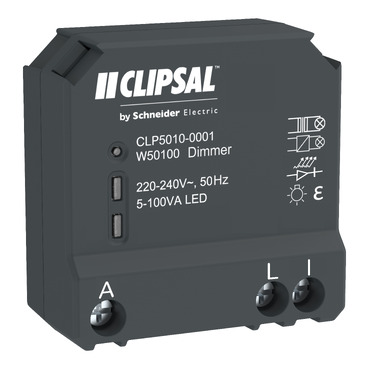
If Multi-way pushbutton dimming is required it is recommended to use the Wiser Micro Dimmer Module and Bell press mechanisms ( CLP5010-0001 and 60PBBP)
This setup allows a short press to turn on and off the dimmer while a long press will ramp up or ramp down the dimmer.( see attached for wiring diagram)
For further information please visit https://www.clipsal.com/products/detail?CatNo=CLP5010-0001&backto=/search?q=CLP&tab-document-1=0&itemno=CLP5010-0001