


Imagine the possibilities with Clipsal Wiser
As technology evolves we are always looking for better ways to help keep your home connected and offer you more smart home options. To help with this, we have released the Wiser by SE app packed with user-friendly features and to make it easy for you to expand your smart home.
If you are currently using the Wiser Room App, we need you to follow a few simple steps to help keep your Clipsal Bluetooth dimmers, switches, timers and sockets up-to-date and connected to the smart devices around your home.
This will help your Clipsal connected home to be able to continue to grow with you, and make it easier to connect to more Clipsal Wiser smart home options.
Upgrade to Wiser by SE
The Wiser Room app has now been removed from the main app stores and is only available through the links provided below. These links will be deactivated at any moment. To continue using your Wiser devices, follow the steps below to upgrade to the Wiser by SE app.
How to run the Wiser App Update
Follow four simple steps below.

Step 1:
If you haven’t updated since 2022 or do not have the app, download the latest version of the Wiser Room App. Refer to the below section for the download links.
Step 2:
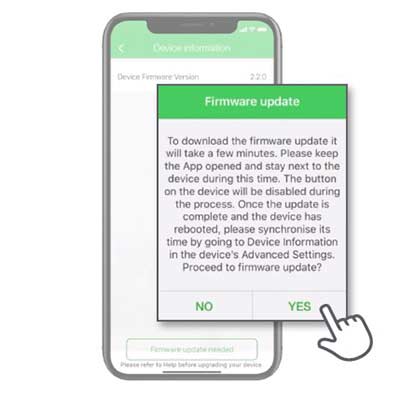
Connect to your current connected devices and ensure updated (eg: Bluetooth dimmer, timers, switches)
Step 3:
Download the Wiser by SE app, create an account and connect your Iconic devices.

Step 4:
Watch our helpful videos to learn how to maximise the tools in your Wiser by SE app.

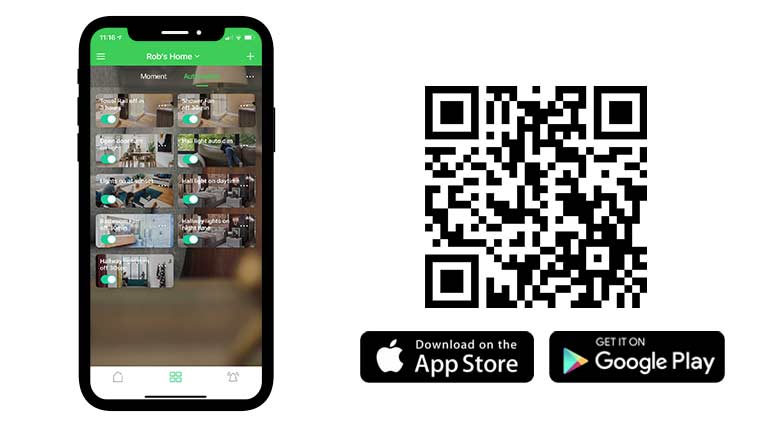
Download Wiser by SE app
Available on the App Store and Google Play, Wiser by SE app is your smart home assistant.
Upgrading to the Wiser by SE app gives you a simple and easy way to add more smart home options and possibilities to your home when you are ready with the addition of a Wiser Hub, including:
- Moment setting, control and automations
- Push notification
- Voice control
- Control from anywhere
- Home management
Update Clipsal connected devices for Wiser
Find instructions on upgrading to the Wiser by SE App
Ready to upgrade to the Wiser by SE app from your Wiser Room app? Download our PDF guide below to get started and prepare your device for the app upgrade.

Get ready for more smart home options to come
By upgrading to the Wiser by SE app, your home will be one step closer to becoming even smarter.
You may now have the option to add a Wiser Hub and other devices to create moments (scenes), automation functions, voice control or control your home from anywhere in the world.
If you want to add to your smart home options and functionalities find out about our Clipsal Wiser Smart Home options today. Wiser is compatible with existing Clipsal Bluetooth devices making changes and updates simple and easy.
Frequently Asked Questions
When I try to connect my Bluetooth device to Wiser by SE it says I need firmware from Wiser Room, how do I get this app?
Hide ShowThe Legacy Wiser Room App was previously available from https://www.clipsal.com/wiser-app-update
The Wiser Room App will no longer be available to download from any App Stores after the 31st of December 2025.
For further support with your device please contact Technical Support via the website www.clipsal.com, phone 13 73 28 (13 SEAU) or email techsupport.pz@se.com
My Bluetooth Wiser products will not convert to Zigbee how can I update the device?
Hide ShowDevices can have firmware updated via Wiser Room if you have this App installed on your phone/device.
The Legacy Wiser Room App was previously available from https://www.clipsal.com/wiser-app-update
The Wiser Room App will no longer be available to download from any App Stores after the 31st of December 2025.
For further support with your device please contact Technical Support via the website www.clipsal.com, phone 13 73 28 (13 SEAU) or email techsupport.pz@se.com
Is the Wiser Room app still available to download?
Hide ShowThe Wiser Room App will no longer be available to download from any App Stores after the 31st of December 2025.
Please use the Wiser by SE app or for further support with your device please contact Technical Support via the website www.clipsal.com, phone 13 73 28 (13 SEAU) or email techsupport.pz@se.com
I am about to update my devices with Wiser Room, when do I download Wiser by SE and do I still need Wiser Room installed after updating devices?
Hide ShowYou can download the Wiser by SE App at any time, however, depending on the age and current firmware on your Bluetooth devices they may not be compatible with Wiser by SE until they have completed a firmware update within Wiser Room.
Once you have finished updating the devices in Wiser Room there is no longer a need to keep it so you are able to remove the App. It is recommended to first remove all the devices prior to removing the App.
Can I keep using the Wiser Room App?
Hide ShowYou are able to keep using the Wiser Room App, however you will not be able to access any new features, firmware updates or functions that are available in the Wiser by SE App.