
Clipsal - Max 4 Pad lock device Suitable for MAX4 circuit breakers switches & RCDs Suits padlocks with shafts up to 6mm
Item Number: 4LD
Datasheet

Specifications
Design
Range of product
Product brand
Product or component type
Physical
Mercury free
Rohs exemption information
Environmental disclosure
Reach regulation
China rohs regulation
Eu rohs directive
California proposition 65
Others
Legacy weee scope
Package 1 bare product quantity
Average percentage of recycled plastic content
Warranty duration(in months) bmecat
Weee label
Weee applicability
Unit type of package 1
Number of units in package 1
Package 1 height
Package 1 width
Package 1 length
Package 1 weight
Sustainable packaging
Take-back
Product contributes to saved and avoided emissions
Removable battery
Average percentage of recycled metal content
Packaging made with recycled cardboard
Packaging without single use plastic
End of life manual availability
Take-back
Warranty (in months)
Documents & downloads
-
All
-
Product Brochures
-
Declaration of Conformity (Sustainability)
Circuit Protection Slim RCBO Range. Same slim design... much bigger range, 26587
VERSION
1.0
DATE
29 Sep 2023
REVISION
1.0

Choosing the correct surge protection equipment. An easy to use guide for contractors
VERSION
1.0
DATE
10 Dec 2018
REVISION
1.0

Surge Protection Product Guide
VERSION
1.0
DATE
10 Dec 2018
REVISION
1.0

Frequently Asked Questions
How to set a Static or Fixed IP, for 5500CN2 C-Bus Network Interface
Hide Show
Assuming that it's powered up and connected to the same network where your PC is connected to.
Assuming that you have installed Toolkit software where C-Bus Control System IP Utility is also installed.
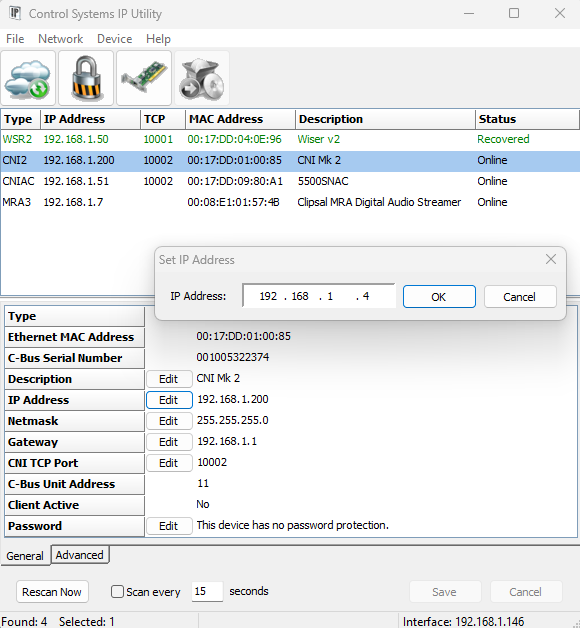
- From start menu run the C-Bus Control System IP Utility
- Select the Cloud Icon to scan for C-Bus network interface
- Select the C-Bus network interface you wish to specify the static IP address for
- Select the edit button and type the desired static IP address and click ok
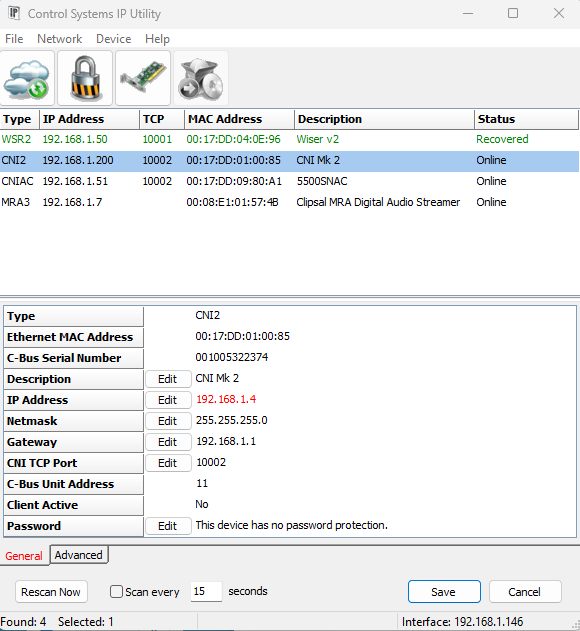
- The new IP address will be showing in red
- Hit the save button will apply the change and the C-Bus network interface will reboot and shall now have the new IP address