
SpaceLogic C-Bus Relay voltage free 16 channel, DIN rail mounted, selectable inbuilt C-Bus power supply
Item Number: 5516RVF


Specifications
Design
Range of product
Product brand
Range
Product or component type
Device application
Physical
Rated voltage
- 220...240 V AC 50 Hz
- 100...120 V AC 60 Hz
Local signalling
Connector type
Load type
- LED lamp: 400 W, 230 V
- LED lamp: 150 W, 110 V
- incandescent lamps: , 10 A
- inductive load: , 10 A
- motor: , 5 A
[ie] rated operational current
Inrush current
- 800 A during 0.2 ms
- 165 A during 20 ms
Number of channels
Width
Height
Depth
Connections - terminals
Connections - terminals
Device mounting
Net weight
Ip degree of protection
Device presentation
Ambient air temperature for operation
Relative humidity
Product certifications
- CE
- RCM
- UKCA
Standards
- AS/NZS 60669.2.1
- IEC 60669-2-1
- IEC 60669-1
Reach free of svhc
Mercury free
Rohs exemption information
Environmental disclosure
Reach regulation
China rohs regulation
Eu rohs directive
Others
Legacy weee scope
Package 1 bare product quantity
Package 2 bare product quantity
Package 3 bare product quantity
Average percentage of recycled plastic content
Warranty duration(in months) bmecat
Weee label
Weee applicability
[uc] control circuit voltage
- 230 V AC 50 Hz +/- 10 %
- 110 V AC 60 Hz +/- 10 %
Maximum switching current
Operational power in w
- 400 W
- 150 W
[us] rated supply voltage
Minimum switching capacity
Number of outputs
Number of modules
Operating rate
Minimum switching current
Minimum switching voltage
Operating position
Number of contacts as normally open contact
Contact terminal arrangement
With led indication
Control button type
Forced guided contact present
Control circuit type
Contacts type and composition
Tightening torque
Unit type of package 1
Number of units in package 1
Package 1 height
Package 1 width
Package 1 length
Package 1 weight
Unit type of package 2
Number of units in package 2
Package 2 height
Package 2 width
Package 2 length
Package 2 weight
Unit type of package 3
Number of units in package 3
Package 3 height
Package 3 width
Package 3 length
Package 3 weight
Total lifecycle carbon footprint
Carbon footprint of the manufacturing phase [a1 to a3]
Carbon footprint of the manufacturing phase [a1 to a3]
Carbon footprint of the distribution phase [a4]
Carbon footprint of the distribution phase [a4]
Carbon footprint of the installation phase [a5]
Carbon footprint of the installation phase [a5]
Carbon footprint of the use phase [b2, b3, b4, b6]
Carbon footprint of the use phase [b2, b3, b4, b6]
Sustainable packaging
Carbon footprint of the end-of-life phase [c1 to c4]
Carbon footprint of the end-of-life phase [c1 to c4]
Pvc free
Halogen-free status
Silicone-free
Energy efficiency optimized
Take-back
Product contributes to saved and avoided emissions
Removable battery
Total lifecycle carbon footprint
Average percentage of recycled metal content
Packaging made with recycled cardboard
Packaging without single use plastic
Halogen-free status
Pvc free
Silicone-free
End of life manual availability
Take-back
Warranty (in months)
Documents & downloads
-
All
-
Product Brochures
-
Environmental Disclosure
-
End of Life Manual
-
Installation Instruction
-
Operating Manuals
-
Quick Start Guide
-
Declaration of Conformity
-
Certificates (MSDS)
-
Declaration of Conformity (Sustainability)
-
Software - Release
-
Software - Utility

C-Bus C-Gate 3 Linux Release Notes V3.7.0
VERSION
3.0
DATE
05 Mar 2026
REVISION
3.0
C-Bus C-Gate 3 Windows Installer, Release Notes V3.7.0
VERSION
2.0
DATE
05 Mar 2026
REVISION
2.0
SpaceLogic C-Bus Voltage Free Relays
VERSION
1.0
DATE
29 Aug 2024
REVISION
1.0
SpaceLogic C-Bus Commission Create Application Items Quick Start Guide
VERSION
1.0
DATE
04 Mar 2026
REVISION
1.0
SpaceLogic C-Bus Quickstart Open Using V1
VERSION
1.0
DATE
09 Apr 2025
REVISION
1.0
SpaceLogic C-Bus Commission Project Space V1.0
VERSION
1.0
DATE
09 Apr 2025
REVISION
1.0
Cyber Security Law Statement of Compliance - C-Bus Devices
VERSION
1.0
DATE
19 Feb 2026
REVISION
1.0
Schneider, 5504RVF_5508RVF and 5516RVF electronic relays, EU Declaration of Conformity
VERSION
1.0
DATE
04 Sep 2024
REVISION
1.0
Schneider, 5504RVF_5508RVF and 5516RVF electronic relays, UK Declaration of Conformity
VERSION
1.1
DATE
04 Sep 2024
REVISION
1.1

5516RVF EU RoHS Directive
VERSION
1.0
DATE
01 Jan 1900
REVISION
1.0
5516RVF EU RoHS Directive
VERSION
1.0
DATE
01 Jan 1900
REVISION
1.0
5516RVF EU RoHS Directive
VERSION
1.0
DATE
01 Jan 1900
REVISION
1.0
5516RVF EU RoHS Directive
VERSION
1.0
DATE
01 Jan 1900
REVISION
1.0
5516RVF REACh Regulation
VERSION
1.0
DATE
01 Jan 1900
REVISION
1.0
5516RVF REACh Regulation
VERSION
1.0
DATE
01 Jan 1900
REVISION
1.0

SpaceLogic C-Bus Commission and Release Notes V2.14.0
VERSION
1.0
DATE
21 Apr 2026
REVISION
1.0
C-Bus Software Bundle 0426
VERSION
1.0
DATE
17 Apr 2026
REVISION
1.0
C-Bus C-Gate 3 Linux Package and Release Notes V3.7.1
VERSION
1.0
DATE
13 Apr 2026
REVISION
1.0
Schedule Plus Release Notes V5.12.0
VERSION
1.0
DATE
13 Apr 2026
REVISION
1.0
C-Bus C-Gate 3 Windows Installer and Release Notes V3.7.1
VERSION
1.0
DATE
10 Apr 2026
REVISION
1.0
C-Bus Toolkit Software and Release Notes V1.19.4
VERSION
1.0
DATE
10 Apr 2026
REVISION
1.0
C-Bus Toolkit Software and Release Notes V1.18.1
VERSION
1.0
DATE
08 Apr 2026
REVISION
1.0
SpaceLogic, C-Bus Software Bundle 0226
VERSION
1.0
DATE
12 Mar 2026
REVISION
1.0
Schedule Plus Software and Release Notes V5.11.0
VERSION
1.0
DATE
07 Mar 2026
REVISION
1.0
C-Bus C-Gate 3 Linux Package and Release Notes V3.7.0
VERSION
1.0
DATE
07 Mar 2026
REVISION
1.0
C-Bus C-Gate 3 Windows Installer and Release Notes V3.7.0
VERSION
1.0
DATE
07 Mar 2026
REVISION
1.0
C-Bus Toolkit Software and Release Notes V1.19.3
VERSION
1.0
DATE
06 Mar 2026
REVISION
1.0
SpaceLogic C-Bus Commission and Release Notes V2.13.0
VERSION
1.0
DATE
06 Mar 2026
REVISION
1.0
C-Bus Software Bundle 1025
VERSION
1.0
DATE
29 Oct 2025
REVISION
1.0
SpaceLogic C-Bus Commission Release Notes V2.12.0
VERSION
1.0
DATE
29 Oct 2025
REVISION
1.0
C-Bus Toolkit Software and Release Notes V1.19.2
VERSION
1.0
DATE
23 Oct 2025
REVISION
1.0
C-Bus C-Gate 3 Windows Installer and Release Notes V3.6.0
VERSION
1.0
DATE
26 Sep 2025
REVISION
1.0
C-Bus C-Gate 3 Linux Package and Release Notes V3.6.0
VERSION
1.0
DATE
26 Sep 2025
REVISION
1.0
Schedule Plus Software and Release Notes V5.10.0
VERSION
1.0
DATE
25 Sep 2025
REVISION
1.0
SpaceLogic, C-Bus Software Bundle 0625
VERSION
1.0
DATE
05 Jun 2025
REVISION
1.0
C-Bus C-Gate 3 Linux Package and Release Notes V3.5.0
VERSION
1.0
DATE
05 Jun 2025
REVISION
1.0
C-Bus C-Gate 3 Windows Installer and Release Notes V3.5.0
VERSION
1.0
DATE
04 Jun 2025
REVISION
1.0
Schedule Plus Software and Release Notes V5.9.0
VERSION
1.0
DATE
02 Jun 2025
REVISION
1.0
C-Bus Toolkit Software and Release Notes V1.19.0
VERSION
1.0
DATE
02 Jun 2025
REVISION
1.0
SpaceLogic C-Bus Commission and Release Notes V2.10.0
VERSION
1.0
DATE
01 Jun 2025
REVISION
1.0
C-Bus Software Bundle 0425
VERSION
1.0
DATE
09 May 2025
REVISION
1.0
SpaceLogic, C-Bus Software Bundle 0225
VERSION
1.0
DATE
24 Feb 2025
REVISION
1.0
C-Bus C-Gate 3 Linux Package and Release Notes V3.4.1
VERSION
1.0
DATE
21 Feb 2025
REVISION
1.0
SpaceLogic C-Bus Commission and Release Notes V2.9.0
VERSION
1.0
DATE
21 Feb 2025
REVISION
1.0
Schedule Plus Software and Release Notes V5.8.0
VERSION
1.0
DATE
20 Feb 2025
REVISION
1.0
C-Bus C-Gate 3 Windows Installer and Release Notes V3.4.1
VERSION
1.0
DATE
19 Feb 2025
REVISION
1.0
SpaceLogic C-Bus Commissioning Software Bundle 1224
VERSION
1.0
DATE
18 Feb 2025
REVISION
1.0
SpaceLogic C-Bus Software Package 0924
VERSION
1.0
DATE
11 Sep 2024
REVISION
1.0
Frequently Asked Questions
How to enable/disable the C-Bus system clock generator for 5516RVF
Hide ShowThe integrated C-Bus Clock generator can be enabled or disabled via the front panel by performing a short press on the top second-to-right button whilst holding down the top left channel button to toggle the enabled state.
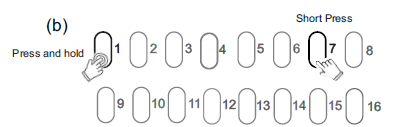
The enabled status of the integrated C-Bus Clock is shown on the C-Bus indicator.
(Green - Enable, Yellow - Disable).

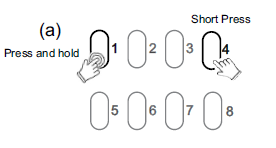
For 5508RVF and 5504RVF
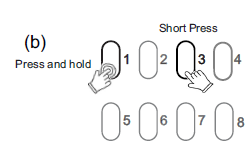
Is the Spacelogic Dimmer/Relay 200mA inbuilt Power supply enabled by default?
Hide ShowBy default, the Spacelogic Dimmer/Relay inbuilt 200mA C-Bus Power Supply is disabled. It can be enabled by using the Channel Indicator buttons on the front of the unit.
How to enable/disable C-Bus power supply for 5516RVF
Hide ShowThe integrated C-Bus Power Supply can be enabled or disabled via the front panel by performing a short press on the top right channel button whilst holding down the top left channel button to toggle the enabled state.
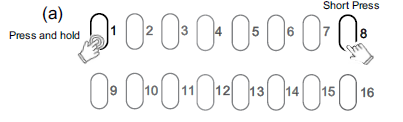
By default, the integrated 200 mA C-Bus Power supply is disabled.
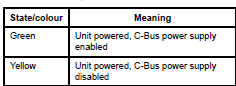
The enabled status of the integrated C-Bus power supply is shown on the Unit indicator.
(Green - Enable, Yellow - Disable).
For 5508RVF and 5504RVF