




Specifications
Design
| Range | TeSys |
|---|---|
| Product or component type | switch body |
| Warranty | 18 months |
Physical
| Mounting support |
|
|---|---|
| [ue] rated operational voltage | 690 V AC 50/60 Hz |
| [ie] rated operational current | 41.5 A AC-23 Ue: 400 V |
| Mechanical durability | 30000 cycles |
| Electrical durability |
|
| Connections - terminals |
|
| Height | 83 mm |
| Width | 60 mm |
| Depth | 65 mm |
| Net weight | 0.5 kg |
| Standards | IEC 60947-3 |
| Product certifications |
|
| Ip degree of protection | IP20 conforming to IEC 60529 |
| Ambient air temperature for operation | -20...50 °C |
| Toxic heavy metal free | Yes |
| Mercury free | Yes |
| Rohs exemption information | Yes |
| Environmental disclosure | ENVPEP2211006EN |
| Reach regulation | Reference contains Substances of Very High Concern above the threshold |
| China rohs regulation | Product out of China RoHS scope |
| Eu rohs directive | Compliant |
Documents & downloads
-
All
-
CAD Files and Packs
-
Technical Data Catalogues
-
Environmental Disclosure
-
Installation Instruction
-
Technical illustration
-
Technical Drawing
-
Certificates (MSDS)
-
Declaration of Conformity
-
Declaration of Conformity (Sustainability)


3 poles VARIO switches disconnector, switch body base 63, 80 A. - Dimensions - Technical drawing
VERSION
1.0
DATE
03 Mar 2022
REVISION
1.0
3 poles VARIO switches disconnector, switch body base 63, 80 A. - Dimensions - Technical drawing
VERSION
1.0
DATE
03 Mar 2022
REVISION
1.0
UL_Certificate_TeSys Vario
VERSION
1.0
DATE
29 Jun 2026
REVISION
1.0
CCC_TeSys Vario_V3&V4
VERSION
1.0
DATE
25 Nov 2024
REVISION
1.0
DNV-GL Marine Certificate TeSys VARIO - V02-01-0-1-2-3-4-5-6 disconnection switch
VERSION
1.0
DATE
11 Mar 2024
REVISION
1.0
CB_Certificate_TeSys V3&V4
VERSION
1.0
DATE
23 Aug 2023
REVISION
1.0
CSA Certificate_ TeSys Vario
VERSION
1.0
DATE
30 Dec 2022
REVISION
1.0
V3 EU RoHS Directive
VERSION
1.0
DATE
01 Jan 1900
REVISION
1.0
V3 EU RoHS Directive
VERSION
1.0
DATE
01 Jan 1900
REVISION
1.0
V3 EU RoHS Directive
VERSION
1.0
DATE
01 Jan 1900
REVISION
1.0
V3 EU RoHS Directive
VERSION
1.0
DATE
01 Jan 1900
REVISION
1.0
V3 EU RoHS Directive
VERSION
1.0
DATE
01 Jan 1900
REVISION
1.0
V3 EU RoHS Directive
VERSION
1.0
DATE
01 Jan 1900
REVISION
1.0
V3 EU RoHS Directive
VERSION
1.0
DATE
01 Jan 1900
REVISION
1.0
V3 EU RoHS Directive
VERSION
1.0
DATE
01 Jan 1900
REVISION
1.0
V3 REACh Regulation
VERSION
1.0
DATE
01 Jan 1900
REVISION
1.0
V3 REACh Regulation
VERSION
1.0
DATE
01 Jan 1900
REVISION
1.0
V3 REACh Regulation
VERSION
1.0
DATE
01 Jan 1900
REVISION
1.0
V3 REACh Regulation
VERSION
1.0
DATE
01 Jan 1900
REVISION
1.0
Frequently Asked Questions
How can I update the firmware of an eDLT to v2.X?
Hide ShowA firmware upgrade of an eDLT to v2.X can only be done in C-Bus Commission; however, the eDLT must support hardware v3.0.
Some key points to remember when performing a firmware upgrade using C-Bus Commission:
• In C-Bus Toolkit, you can only upgrade an eDLT’s firmware up to v1.8
• Once you upgrade the firmware to v2.X, you cannot revert to an earlier version
• A firmware upgrade to v2.X will factory reset the unit; the device will need to be re-programmed
Can I program the properties of an eDLT using C-Bus Commission?
Hide ShowSpaceLogic C-Bus Commission v2.15.0 or higher supports the capability to program eDLT's with the following characteristic:
Hardware: v3.0
Firmware: v2.X
What do the terms PWH1 I1 and PWH1 V1 mean in the Power Harmonics module?
Hide ShowProduct Line: ION 9000 Power meters
Environment: METSEION92030
Resolution:
Explanation of Power Harmonics Angle Parameters
The parameters PWH1 V1/V2/V3 Angle and PWH1 I1/I2/I3 Angle are sourced from the Power Harmonics module under the Fundamental Power group. These parameters represent the phase angles, measured in degrees, of voltage and current for each phase at the fundamental frequency.
- PWH1 V1 Angle → Phase angle of Voltage Phase A
- PWH1 V2 Angle → Phase angle of Voltage Phase B
- PWH1 V3 Angle → Phase angle of Voltage Phase C
- PWH1 I1 Angle → Phase angle of Current Phase A
- PWH1 I2 Angle → Phase angle of Current Phase B
- PWH1 I3 Angle → Phase angle of Current Phase C
These values are commonly used for power quality analysis and phase relationship verification at the fundamental frequency.
C-Bus download tap not displaying in the download website
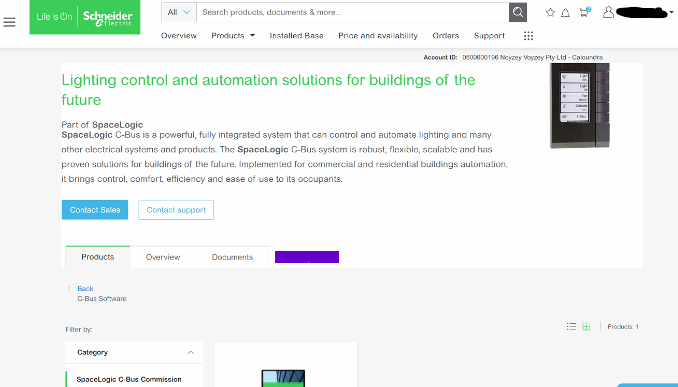
Hide ShowThe software TAB disappearing is a Browser Cache problem for SE.COM.
 >
>It is a fairly simple fix;
This is how to clear your browser cache only for SE.com, instead of clearing all your cache info for other sites.
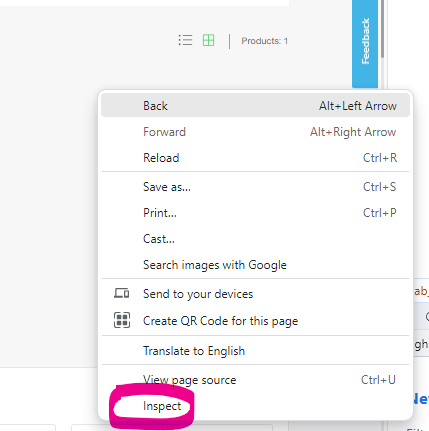
Right click> Inspect
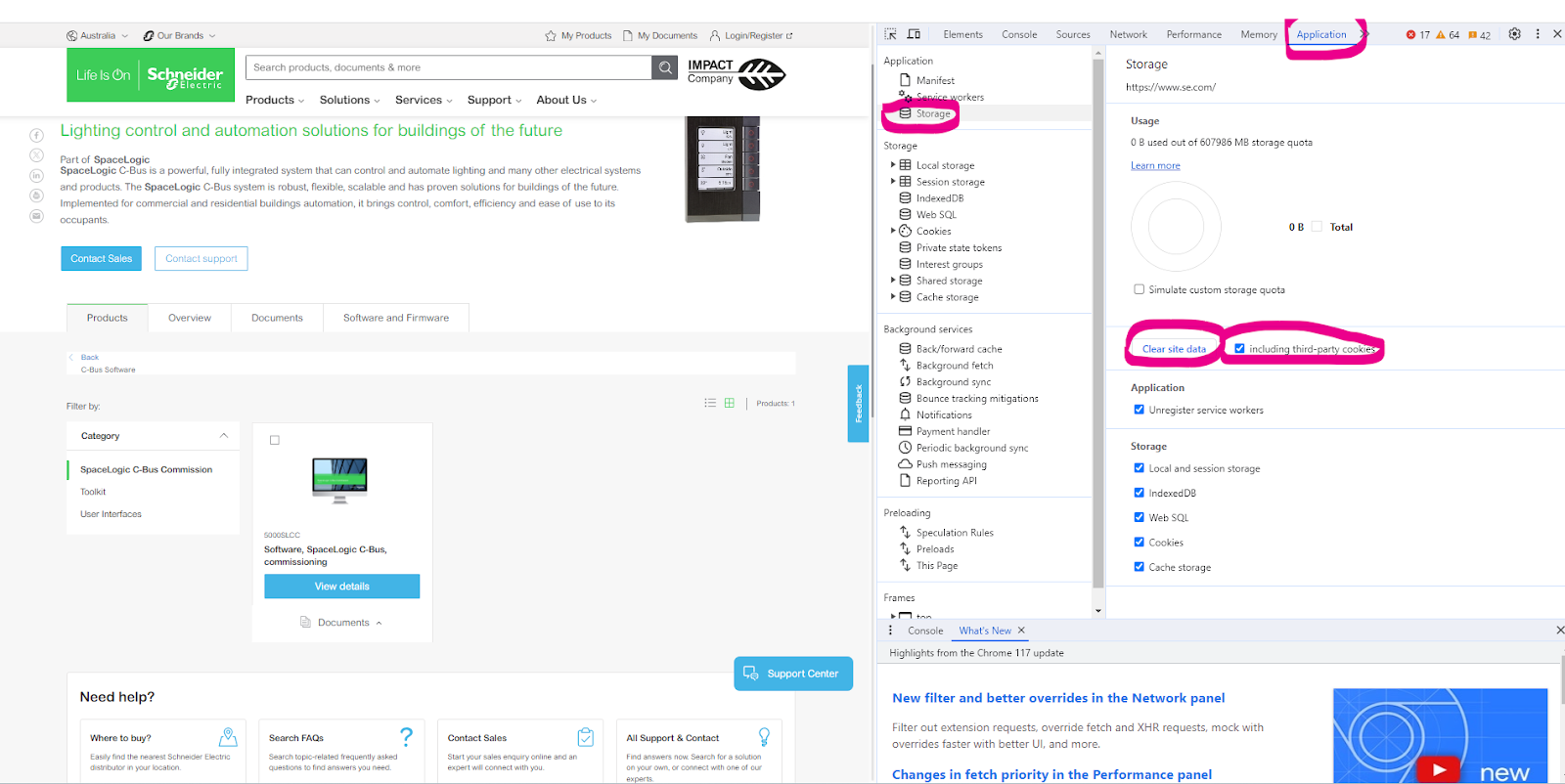
Select Application> Storage> tick including third-party cookies then hit > Clear site data
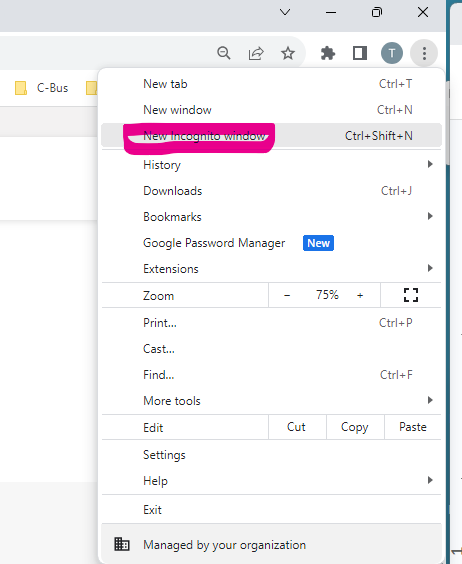
Another option is to run New Incognito window
What is the outer dimensions of the CAT5E 2D4P5IPV3B data cable?
Hide ShowSome of the key features are:
- Product standard certification: UL File E 215065
- Application: Horizontal wiring in LAN
- Complaint to RoHS standard: Yes
- Average thickness: 0.18 mm
- Minimum point thickness: 0.15 mm
- Insulation diameter: 0.87 mm
- Rip cord
- Bend radius: 50 mm
VIDEO - How to Test Interconnection of 755RFB2 Base with 755PSMA4 Smoke Alarm?
Hide Show►Learn More: https://www.clipsal.com
How to Enable +/- Speeds Around Preset Speeds on ATV320 Drive
Hide ShowIt is possible to set preset speeds on the ATV320 drive and also allow for manual speed adjustments above and below those presets. Please refer to the steps below.
- Set desired preset speeds in [PRESET SPEEDS] menu as shown.
RDY -> CONF -> FULL -> LAC -> Epr (Expert)
RDY-> CONF -> FULL -> Fun [Application Function] -> PSS - [Preset Speeds]
- Set up desired values for speed around reference in [SPEED AROUND REFERENCE] menu.
RDY -> CONF -> FULL -> Fun [Application Function] -> SrE (menu shown below)
Example:
Setting Access level to Expert access.
Assigning Digital Inputs 2 and 3 to control preset speeds (enabling up to three preset speeds)
Preset Speeds 2, 3, and 4 configured to 14 Hz, 18 Hz, and 22 Hz respectively.
Setting Digital input 4 for increase in speed (+).
Setting Digital input 5 for decrease in speed (-).
A +/- speed variation limit of 13% has been applied, restricting any increase or decrease from the preset speed to a maximum of 13%.
Acceleration and deceleration time for changing speed set to 5s.
Is bonding required for the internal foil of the 2D4P6AIPV3R-BU?
Hide ShowWhat are other benefits of the new design of Cat6A U/UTP cable?
Hide Show- Smaller physical dimensions on cable external diameter compared to previous Clipsal Cat6A UTP cable, thus reduced space requirements for multiple cable runs.
- New Cat6A UTP cable weight is 28% lighter than previous product
- New Cat 6A UTP cable uses less raw material to manufacture, resulting in reduced consumption of materials and resources.
- Higher performance against heat rise in case of PoE (Power over Ethernet)
Why is there an internal foil on the new design of Cat6A cable, 2D4P6AIPV3R-BU?
Hide ShowHow is the new design of Cat6A U/UTP cable terminated?
Hide ShowVideo: How to enable or disable an ION Meter Web Page?
Hide ShowIssue
When trying to connect to an ION meter through a web browser, an error " Page can not be displayed" or "This site can't be reached", depending on which web browser, is displayed.
Product Line
ION 8650, 8600, 7650, 7550, 7600, 7500
PM8000
Environment
ION Meter Web Page
Cause
The ION Meter Web Page has been disabled.
Resolution
Enable the ION Meters Web Page functionality.
Note: For PM8000 meters, ION Setup V3.0.15140.02 or later must be used. The latest version of ION Setup can be obtained from FA212816.
1. Connect to the meter in Advanced Mode using ION Setup.
2. Select the Comm Modules folder and then the Ethernet module.
3. Under the Setup Registers Tab, select ETH1 Enable Webserver and change the value to 'Yes' to enable the Web server, or 'No' to disable it. (Refer to the screen shot below)
NOTE: the ETH1 Webserver Config Access will enable or disable the ability to make configuration changes from the ION Meter Web Page.
Note: For instructions on connecting to an ION Meter in Advanced Mode, please refer to ION Setup 3.0 User Guide. Latest ION Setup User Guide can be obtained by visiting following link:
https://www.schneider-electric.com/en/product-range-download/61461-ion-setup-3.0
Please note that if the device is communicating over a managed switch, you may need to use the IP address signed by the switch when trying to browse the meter webpage.
How to set a Static or Fixed IP, for 5500CN2 C-Bus Network Interface
Hide Show
Assuming that it's powered up and connected to the same network where your PC is connected to.
Assuming that you have installed Toolkit software where C-Bus Control System IP Utility is also installed.
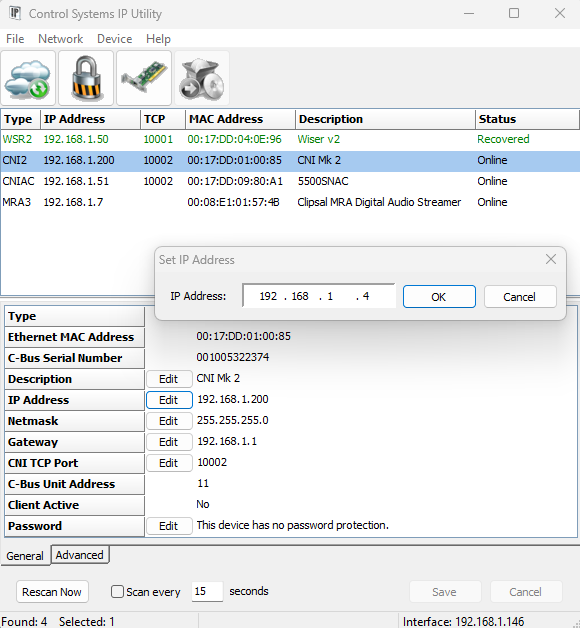
- From start menu run the C-Bus Control System IP Utility
- Select the Cloud Icon to scan for C-Bus network interface
- Select the C-Bus network interface you wish to specify the static IP address for
- Select the edit button and type the desired static IP address and click ok
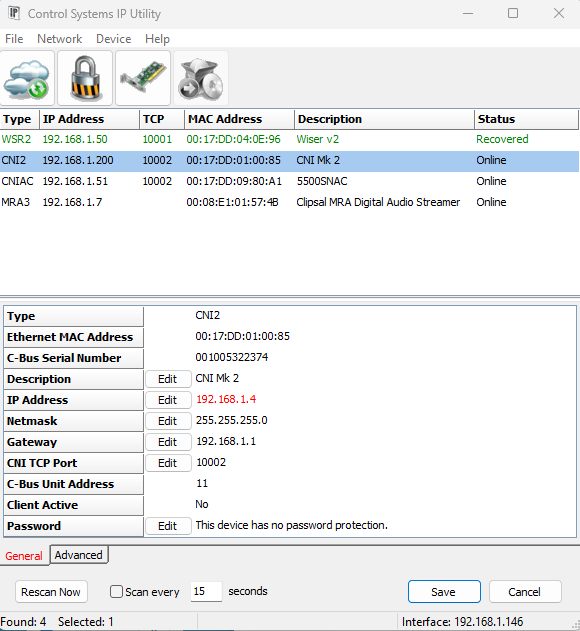
- The new IP address will be showing in red
- Hit the save button will apply the change and the C-Bus network interface will reboot and shall now have the new IP address
How is an Altivar VFD set to always run a particular speed when no reference input is connected?
Hide ShowWants the Altivar VFD set to always run at a particular speed when no reference input is connected.
Product Line:
Altivar 12, 32, 312, 61, 71, 212, 320
Environment:
All models
Cause:
VFD does not run the motor without a speed reference.
Resolution:
If there is no external speed reference when the VFD gets a run command, then it will always run at the minimum speed programmed to the VFD. Set the minimum speed parameter to the desired run speed. Use parameter LSP for the Altivar12, 32, 312, 320, 61, 71 drives. Use parameter LL for the Altivar 212 drive. These can be adjusted while the motor is running.