




Specifications
Design
| Range | TeSys |
|---|---|
| Product or component type | switch body |
Physical
| Mounting support |
|
|---|---|
| [ue] rated operational voltage | 690 V AC 50/60 Hz |
| [ie] rated operational current | 21.8 A AC-23 Ue: 400 V |
| Mechanical durability | 100000 cycles |
| Electrical durability |
|
| Connections - terminals |
|
| Height | 74 mm |
| Width | 55 mm |
| Depth | 60 mm |
| Net weight | 0.2 kg |
| Standards | IEC 60947-3 |
| Product certifications |
|
| Ip degree of protection | IP20 conforming to IEC 60529 |
| Ambient air temperature for operation | -20...50 °C |
| Toxic heavy metal free | Yes |
| Mercury free | Yes |
| Rohs exemption information | Yes |
| Environmental disclosure | ENVPEP2211006EN |
| Eu rohs directive | Compliant |
Documents & downloads
-
All
-
CAD Files and Packs
-
Technical Data Catalogues
-
Environmental Disclosure
-
Installation Instruction
-
Technical illustration
-
Technical Drawing
-
Certificates (MSDS)
-
Declaration of Conformity
-
Declaration of Conformity (Sustainability)


3 poles VARIO switches disconnector, switch body base 25, 32, 40 A. - Dimensions - Technical drawing
VERSION
1.0
DATE
03 Mar 2022
REVISION
1.0
3 poles VARIO switches disconnector, switch body base 25, 32, 40 A. - Dimensions - Technical drawing
VERSION
1.0
DATE
03 Mar 2022
REVISION
1.0
UL_Certificate_TeSys Vario
VERSION
1.0
DATE
29 June 2026
REVISION
1.0
CCC_TeSys Vairo_V02&V01&V0&V1&V2
VERSION
1.0
DATE
25 Nov 2024
REVISION
1.0
DNV-GL Marine Certificate TeSys VARIO - V02-01-0-1-2-3-4-5-6 disconnection switch
VERSION
1.0
DATE
11 Mar 2024
REVISION
1.0
CB_Certificate_TeSys Vario V0&V1&V2&V02
VERSION
1.0
DATE
25 July 2023
REVISION
1.0
CSA Certificate_ TeSys Vario
VERSION
1.0
DATE
30 Dec 2022
REVISION
1.0
V1 EU RoHS Directive
VERSION
1.0
DATE
01 Jan 1900
REVISION
1.0
V1 EU RoHS Directive
VERSION
1.0
DATE
01 Jan 1900
REVISION
1.0
V1 EU RoHS Directive
VERSION
1.0
DATE
01 Jan 1900
REVISION
1.0
V1 EU RoHS Directive
VERSION
1.0
DATE
01 Jan 1900
REVISION
1.0
V1 EU RoHS Directive
VERSION
1.0
DATE
01 Jan 1900
REVISION
1.0
V1 EU RoHS Directive
VERSION
1.0
DATE
01 Jan 1900
REVISION
1.0
V1 EU RoHS Directive
VERSION
1.0
DATE
01 Jan 1900
REVISION
1.0
V1 EU RoHS Directive
VERSION
1.0
DATE
01 Jan 1900
REVISION
1.0
V1 POP Directive
VERSION
1.0
DATE
01 Jan 1900
REVISION
1.0
V1 POP Directive
VERSION
1.0
DATE
01 Jan 1900
REVISION
1.0
V1 POP Directive
VERSION
1.0
DATE
01 Jan 1900
REVISION
1.0
V1 POP Directive
VERSION
1.0
DATE
01 Jan 1900
REVISION
1.0
V1 POP Directive
VERSION
1.0
DATE
01 Jan 1900
REVISION
1.0
V1 POP Directive
VERSION
1.0
DATE
01 Jan 1900
REVISION
1.0
V1 POP Directive
VERSION
1.0
DATE
01 Jan 1900
REVISION
1.0
V1 POP Directive
VERSION
1.0
DATE
01 Jan 1900
REVISION
1.0
V1 REACh Regulation
VERSION
1.0
DATE
01 Jan 1900
REVISION
1.0
V1 REACh Regulation
VERSION
1.0
DATE
01 Jan 1900
REVISION
1.0
V1 REACh Regulation
VERSION
1.0
DATE
01 Jan 1900
REVISION
1.0
V1 REACh Regulation
VERSION
1.0
DATE
01 Jan 1900
REVISION
1.0
V1 REACh Regulation
VERSION
1.0
DATE
01 Jan 1900
REVISION
1.0
V1 REACh Regulation
VERSION
1.0
DATE
01 Jan 1900
REVISION
1.0
V1 REACh Regulation
VERSION
1.0
DATE
01 Jan 1900
REVISION
1.0
V1 REACh Regulation
VERSION
1.0
DATE
01 Jan 1900
REVISION
1.0
Frequently Asked Questions
New BMXNOR0200H Web Page Access is Disabled
Hide ShowIssue:
How to Enable BMXNOR0200H Web Access
Product Line:
BMXNOR0200H
Control Expert
Resolution:
By default the Web Access in BMXNOR0200H is disabled due to Cyber Security Requirement and you have to use Control Expert 14. x onwards to Enable the Web Access please follow the below steps ,
Step1: Try to Configure a Dummy application using Control Expert & Enable the Web Access in Security settings and save the application as .STA
Step2: Please Open the .STA file without doing a build & download it to the CPU after which the CPU should have the Web Access
NOTE:
If you want to disable the Web Access then as mentioned in the image these Services can be disabled only on BMXNOR0200H Firmware version V1.7 or higher
C-Bus Cable for underground
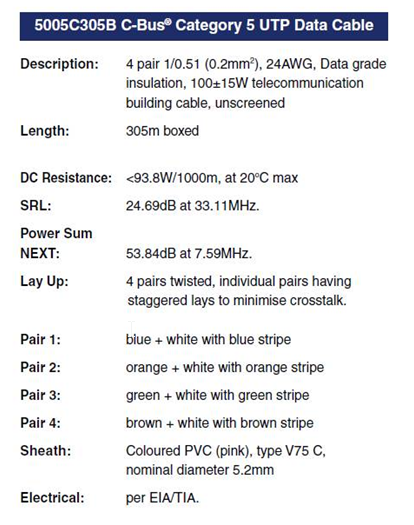
Hide ShowTypically for C-Bus underground cable use it needs to be a Cat5E UTP cable with the similar characteristics / impedance as the C-Bus 5005C305B cable.
If you use an underground CAT5E data cable from brands such as belden or garland etc
We would recommend you ask the supplier to provide confirmation they can provide a CAT5E UTP underground equivalent cable Gel filled.
Do not use shielded cabling.

How to install PUSH Module for Somfy RTS v1.3
Hide ShowPlease see the attached PDF user guide
Also attached is the PEMOD Module file that will be required for the installation via PUSH Project Editor.
Modicon M258 stuck in a boot loop after a firmware update?
Hide ShowQuestion:
A Modicon M258 controller powers up, all LEDs turn on briefly, RUN/MS flashes or turns off, and the Ethernet LEDs continue flashing red/green in a repeating 3-flash cycle. What can cause this boot loop and how can it be recovered?
Answer:
This behaviour could occur if the firmware loaded into the Modicon M258 is not compatible with the controller hardware version.
For M258 PV16 / hardware version 4 controllers, the required firmware depends on the SoMachine version being used:
- SoMachine V3.x: firmware V2.0.31.40
- SoMachine V4.x: firmware V4.0.3.6
Using an incompatible firmware version can cause the controller to reboot continuously and fail to complete startup.
The recommended recovery method is to reload the correct firmware using a USB memory key. Firmware update by USB key is preferred because older versions of Controller Assistant may not check the M258/LMC058 hardware version before downloading firmware. This can allow an incompatible firmware version to be loaded.
After the correct firmware has been reloaded:
1. Reconnect to the controller using the appropriate SoMachine version.
2. Download the correct application.
3. Update the boot application.
4. Power cycle the controller and confirm that the controller starts normally.
If the controller remains in a boot loop after reloading the correct firmware by USB key, and the correct firmware version for the hardware has been confirmed, no further recovery action may be available. In this condition, the controller may be permanently damaged and require replacement.
References:
- For USB firmware reload procedure, refer to Schneider Electric FAQ FA339601.
- For setting the M258/LMC058 to start in RUN mode and updating the boot application, refer to Schneider Electric FAQ FA243994.
How can I update the firmware of an eDLT to v2.X?
Hide ShowA firmware upgrade of an eDLT to v2.X can only be done in C-Bus Commission; however, the eDLT must support hardware v3.0.
Some key points to remember when performing a firmware upgrade using C-Bus Commission:
• In C-Bus Toolkit, you can only upgrade an eDLT’s firmware up to v1.8
• Once you upgrade the firmware to v2.X, you cannot revert to an earlier version
• A firmware upgrade to v2.X will factory reset the unit; the device will need to be re-programmed
How can I check that my C-Bus Controller has access to the internet
Hide ShowUnder Configurator > System > Status > Network Utility

Type google.com in to the IP/Hostname field

If successful you will see package transmit and receive
Where to download the C-Bus Toolkit 1.17.4?
Hide ShowRelease Date: 02/04/2024
Version: V1.17.4
Reference: C-Bus_Toolkit_V1.17.4
C-Gate: 3.3.0 (build 1825)
Operating systems: Windows 11 Professional (64-bit), Windows 10 Professional (64-bit), Windows 10 Enterprise (64-bit), Windows 10, Windows 8, Windows 7
What’s New
C-Bus DALI-2 Gateway
Additional Measurement and Error Reporting application parameters are now supported in this release (future client feature).
C-Bus Digital Dimmers
The network burden property of the digital dimmer devices are now supported in the network calculator in this release.
Performance Improvement
Support has been added for the extended range of C-Bus replies for both new input and output devices in this release.
Fixes
• Fixed an issue with scanning and opening the older DALI Gateway (5502DAL) devices.
• Fixed an issue with setting the C-Bus power supply property for new output devices (future client feature).
Link to download C-Bus Toolkit 1.17.4
https://www.se.com/au/en/download/document/C-Bus-Toolkit_V1.17.4/
or
https://www.se.com/au/en/product-range/2216-spacelogic-cbus-home-automation-system/?parent-subcategory-id=88010&filter=business-5-residential-and-small-business#software-and-firmware
Control Expert V15.3 Silent (Automatic) Installation
Hide ShowIssue:
How to install Control Expert V 15.3 in Silent (Automatic ) Mode ?
Product Line:
Control Expert V15.3
Resolution:
Automatic installation of Control Expert requires no action during the installation. The installation performed is the same as a default installation in manual mode.
It is carried out with the provided install.bat batch command file. This file is at the root of the Control Expert DVD-ROM or in the installation package (.iso file).
Please see the below Steps :
1.Please mount the installer file (the original installer file from our Website) , then press Control +A (to copy the whole contents) on to your PC.
2.Edit the Install.bat file that you have copied to adapt the modifiable parameters to your needs/configuration.
3. Firstly please copy the installer contents path of the folder that is in your PC and paste it to Install.bat file .
4.Secondly Please leave the installation destination folder path by default .
5.By default the Installation Language is English , but you can to below languages according to your needs
6. Next , please Set Driver Install to yes and SESU (Schneider Electric Software Update) to yes
7. Next please Agree with EULA (End User License Agreement) and Save the Changes.
8. Finally , please Right Click and Run the Install Bat file as Run as Admin.
What do the terms PWH1 I1 and PWH1 V1 mean in the Power Harmonics module?
Hide ShowProduct Line: ION 9000 Power meters
Environment: METSEION92030
Resolution:
Explanation of Power Harmonics Angle Parameters
The parameters PWH1 V1/V2/V3 Angle and PWH1 I1/I2/I3 Angle are sourced from the Power Harmonics module under the Fundamental Power group. These parameters represent the phase angles, measured in degrees, of voltage and current for each phase at the fundamental frequency.
- PWH1 V1 Angle → Phase angle of Voltage Phase A
- PWH1 V2 Angle → Phase angle of Voltage Phase B
- PWH1 V3 Angle → Phase angle of Voltage Phase C
- PWH1 I1 Angle → Phase angle of Current Phase A
- PWH1 I2 Angle → Phase angle of Current Phase B
- PWH1 I3 Angle → Phase angle of Current Phase C
These values are commonly used for power quality analysis and phase relationship verification at the fundamental frequency.
What are the System requirements for Unity Pro V13?
Hide ShowSystem: Pentium Processor 2.4 GHz or higher, recommended 3.0 GHz
RAM memory: 2GB minimum; recommended: 4GB
Hard disk: minimum available free space 8 GB, recommended 20 GB
Microsoft Internet Explorer 5.5 or higher
On Windows 7 64bits System, installation of Windows 7 Service Pack 1 (SP1) is mandatory in order to use Unity Pro V13
Windows 7 64bits is recommended for projects using DTMs (example : projects using Modicon M580 controller)
System with Microsoft Windows 10 32/64bits
System: Pentium Processor 2.4 GHz or higher, recommended 3.0 GHz
RAM memory: 2GB minimum; recommended: 4GB
Hard disk: minimum available free space 8 GB, recommended 20 GB
Windows 10 64bits is recommended for projects using DTMs (example : projects using Modicon M580 controller)
System with Microsoft Windows Server 2012 R2
Recommended version: Windows Server 2012 R2, standard version
Processor recommended: 3.20GHz
RAM memory recommended: 16.0 GB
Important notice
Unity Pro requires .NET 3.5 and .NET 4.5.2
Depending on the target Windows version and Windows configuration, .Net versions may be
- not installed
- installed but not enabled ( the related "windows feature" is not set ON )
- installed and enabled
Unity Pro setup tries to automatically install and enable the required .Net on the target Windows if necessary.
On Windows 10 and Windows Server 2012 R2, automatic or manual installation of .Net 3.5 requires an internet connection.
And service “Windows Update” must be started in order to install the .NET Framework 3.5.
If automatic installation of .Net 3.5 fails, please read & follow Microsoft technical notes on .NET 3.5 installation:
- Installing the .NET Framework 3.5 on Windows 8 or 8.1
https://msdn.microsoft.com/en-us/library/hh506443.aspx
Virtualization:
Unity Pro V13 has been successfully tested in the following configuration :
- VirtualBox 5.0.20
- VMware Workstation 12 Pro 12.1.0 build-3272444
DVD-ROM drive: to install the software;
DVD-ROM writer recommended
Display:
Min VGA (800-600).
Recommended:
· SVGA (1024-768 or more) with high color 24 bits
· SVGA (1280-1024 or more) for Windows 10 and Windows Server 2012 R2
Pointing device:
Mouse or compatible devices.
Access rights on the computer
Unity Pro V13 needs to have Administrator access right for installing the software.
For Unity Pro usage User access right are sufficient
Nevertheless Administrator rights must be used for updating the Hardware catalog (CANopen, DTM)
PRM DTM requires administrator rights to work correctly.
Note:
- User must check that all directories used by Unity pro are accessible in read write mode.
Check for the Options Management: Options / General / Paths:
- Project Path
- Import / Export file path
- XVM path
- Project settings templates path
- Project settings template file
- Custom Library path
- Working drive
- Log file path
Check the directory c:\UnityProTemp (Hidden directory) has the following rights: Read, Execute and Write.
If these paths are not accessible an error message will appear and the requested operation will fail
- Access rights & Multi instances : As some components are shared, when several instances of Unity Pro are launched, rights access must be the same on all the instances
- In Windows 7 , if UAC (User Account Control) is set, and if Unity Pro is executed without checking "Run as Administrator", system folders can be only be accessed in read only and FFB Libset can not be modified.
- Start Menu: following short cuts must be executed with “Run as Administrator”:
- Remove Unity Pro
- Repair Unity Pro
- Types Library Update
Unity Pro V13 Readme file is attached.
Where to download the C-Bus Toolkit 1.17.0?
Hide ShowRelease Date: 25/10/2023
Version: V1.17.0
Reference: C-Bus_Toolkit_V1.17.0
C-Gate: 3.2.0 (build 1674)
Operating systems: Windows 11 Professional (64-bit), Windows 10 Professional (64-bit), Windows 10 Enterprise (64-bit), Windows 10, Windows 8, Windows 7.
BREAKING CHANGE
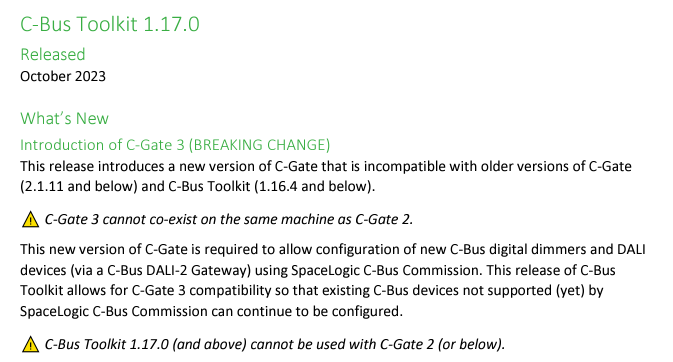
This release introduces a new version of C-Gate 3 that is incompatible with older versions of C-Gate (2.1.11 and below) and C-Bus Toolkit (1.16.4 and below).
This release adds basic support for the DIMDD4 (5504D2D) and DIMDD8 (5508D1D) dimmer devices.
Important Notes:
- C-Gate 3 cannot co-exist on the same machine as C-Gate 2.
- C-Bus Toolkit 1.17.0 (and above) cannot be used with C-Gate 2 (or below).
- Once projects have been converted to the new format, they cannot be used by C-Gate 2 or below.
- We strongly recommend creating a separate back up of projects before installing and running this release.
Link to download C-Bus Toolkit 1.17.0
https://www.se.com/au/en/download/document/C-Bus-Toolkit_V1.17.0/
Where to download the C-Bus Toolkit 1.17.2?
Hide ShowRelease Date: 11/01/2024
Version: V1.17.2
Reference: C-Bus_Toolkit_V1.17.2
C-Gate: 3.2.3 (build 1760)
Operating systems: Windows 11 Professional (64-bit), Windows 10 Professional (64-bit), Windows 10 Enterprise (64-bit), Windows 10, Windows 8, Windows 7
Bug fix:
- Fixed an issue in the Edit Network dialog that prevented the network from being opened or scanned when the interface type was changed from Serial to C-Bus Home Controller.
- Support firmware version 1.3.0 of DIMDD4 (5504D2D) and DIMDD8 (5508D1D) C-Bus Digital Dimmer devices.
Link to download C-Bus Toolkit 1.17.2
https://www.se.com/au/en/download/document/C-Bus-Toolkit_V1.17.2/
Where to download the C-Bus Toolkit 1.17.1?
Hide ShowRelease Date: 08/12/2023
Version: V1.17.1
Reference: C-Bus_Toolkit_V1.17.1
C-Gate: 3.2.2 (build 1716)
Operating systems: Windows 11 Professional (64-bit), Windows 10 Professional (64-bit), Windows 10 Enterprise (64-bit), Windows 10, Windows 8, Windows 7.
Bug fix:
- Issue resolved when clicking the ‘+’ button to add a new application in the eDLT unit dialog.
Updates to C-Gate 3.2.2 include:
- Update C-Bus DALI-2 Gateway firmware version default to version 1.7.0.
- Device update to support C-Bus DALI-2 Gateway and DALI Device Primary Control Function.
- Added support for C-Bus Network Devices section firmware update notification.
- Fixed the transfer of new levels to a C-Bus Controller within existing groups.
Link to download C-Bus Toolkit 1.17.1
https://www.se.com/au/en/download/document/C-Bus-Toolkit_V1.17.1/
How to update M580 PLC project firmware from Version 1.1 to SV 2.0?
Hide ShowIssue:
When trying to update the M580 PLC firmware in Control Expert from version 1.1 to SV2.x or later , we are getting the following errors ,
Product Line:
M580 PLC Range .
Resolution:
Please Export the project file (that has got M580 Project firmware as SV 1.1) to .ZEF and then please search for M580 CPU Change V1V2 Software from Windows Search bar (this software is an Add-ons that comes along with Control Expert) and open the software.
Please import the .ZEF file and click Next and the Converted application will be automatically saved to location in which the previous firmware version file located . The converted application will have a following words added to application name "L2"(for example : Test_L2.ZEF)
Vijeo Designer V6.3 ,HMI License Manager giving error when trying to open the software to license the Vijeo designer Software
Hide ShowIssue:
Encountering the subsequent HMI License Manager error while attempting to access the HMI License Manager for the licensing of Vijeo Designer V6.3
Product Line:
Vijeo Designer V6.3
Resolution:
Please delete the old HMI License Manager V1.0.0 from the following folder , "C:\Program Files (x86)\Schneider Electric\Vijeo-Designer 6.3\HMILicenseManager\
Please unzip and copy & paste , the attached HMI License Manager V1.0.3 to the above folder , then you will be to open HMI license Manager V1.0.3
Can you run both V1.17 and V1.16.4 Toolkit on the same PC/Laptop?
Hide ShowNo You can’t run both on the same machine as C-Gate2 & C-Gate3 they can’t co-exits on the same machines(PC/Laptop).
This is mentioned in the Toolkit 1.17 release note.
https://www.se.com/au/en/download/document/C-Bus-Toolkit_V1.17.0/
What type of firmware file do the SpaceLogic C-Bus Controllers have?
Hide ShowThe SpaceLogic C-Bus Controllers are 5500NAC2, 5500AC2, 5500NAC, 5500SHAC, LSS5500NAC, LSS5500SHAC.
The firmware file type: image file
The firmware version: 1.15.0
The release date: 18 October 2023
The firmware file name: 5500NAC2_Firmware_V1.15.0.img
Links for Exchange and se.com to download the firmware and the related documents:
From SE website:
https://www.se.com/au/en/download/document/5500NAC2_Firmware-V1.15.0/
or
https://www.se.com/au/en/product-range/2216-spacelogic-cbus-home-automation-system/?parent-subcategory-id=88010&filter=business-5-residential-and-small-business#software-and-firmware
From SE Ecoxpert:
https://ecoxpert.se.com/spacelogic-c-bus/software-and-firmware/firmware#tab/documents
How to upgrade firmware for the SpaceLogic C-Bus Controllers?
Hide ShowThe SpaceLogic C-Bus Controllers are 5500NAC2, 5500AC2, 5500NAC, 5500SHAC, LSS5500NAC, LSS5500SHAC.
Links for Exchange and se.com to download the firmware (image file)
5500NAC2_Firmware_V1.15.0.img
From SE website:
https://www.se.com/au/en/download/document/5500NAC2_Firmware-V1.15.0/
or
https://www.se.com/au/en/product-range/2216-spacelogic-cbus-home-automation-system/?parent-subcategory-id=88010&filter=business-5-residential-and-small-business#software-and-firmware
From SE EcoXpert website:
https://ecoxpert.se.com/spacelogic-c-bus/software-and-firmware/firmware#tab/documents
Upgrade firmware
Access to the Configurator page and System page
The path: Configurator → Utility tab → System button → System tab → Upgrade firmware
Click Choose File button and select the firmware file (5500NAC2_Firmware_V1.15.0.img)
Note:
- Do not switch off the Controller during the installation.
- Clean the browser cache after the installation. Use the settings in your browser or the short cuts [Crtl] + [N] or [Crtl] + [F5].
"WARNING: Cannot read the Hardware ID of the device" Error when connect TSXP572634M via OSLoader
Hide ShowIssue:
"WARNING: Cannot read the Hardware ID of the device" is showed up when connecting to Modicon Premium TSXP572634M via OSLoader. See below picture.
Solution:
This issue happens if using a V13 or higher version OSLoader to connect Modicon Premium TSXP572634M, Version 10, 11 or 12 works fine.
Where to download the C-Bus Toolkit 1.16.4?
Hide ShowWhere to download the C-Bus Toolkit 1.16.4?
Release Date: 08/09/2023Version: V1.16.4
Reference: C-Bus_Toolkit_V1.16.4
C-Gate: 2.11.11
Operating Systems: Windows 10, Windows 7, Windows 8, Windows Vista, Windows x86 / x64
It contains eDLT firmware version: V1.7.0
https://www.se.com/au/en/download/document/C-Bus-Toolkit_V1.16.4/
Where to download the C-Bus Toolkit 1.16.0?
Hide ShowThe C-Bus Toolkit 1.16.0 (C-Gate 2.11.8.) is released on 08/11/2021, it can be downloaded from Schneider Electric website.
https://www.se.com/au/en/download/document/C-Bus-Toolkit_V1160/
for our latest toolkit please visit the link below:
Control Expert V16.2 System Requirements
Hide ShowHow to set up the second machine to control the same project?
Hide ShowHow to set up the second machine to control the same project?
follow the instruction in toolkit help file ''Setting up a new remote projects connection"

Setting up a new remote projects connection
You can connect to C-Bus projects remotely by setting up connectivity between C-Bus Toolkit software and C-Gate server, and C-Bus Toolkit project folders.
Before you start
|
§ |
The C-Bus Toolkit host computer needs to be able to set up an ethernet connection between the C-Gate server and the C-Bus Toolkit host computer |
|
§ |
Access to the C-Gate server to update a configuration file for the purpose of identifying each C-Bus Toolkit host computer. |
Follow the procedures below to successfully connect remotely to C-Gate project folders.
Obtaining permissions on the ethernet
If you are intending to connect to a C-Bus Toolkit projects which reside on host computers on an ethernet, you must ensure that your computer has permission to access the network. In most cases, the building site computers have firewall protection. To get access, you need to contact the system administrators who grant login and password access.
Identifying the C-Bus Toolkit host computer
The C-Gate server must know of the existence of any C-Bus Toolkit software which wants to gain access to C-Bus project folders. To be a trusted user of the C-Gate server, the hostname or IP address of the C-Bus Toolkit host computer must be added to a configuration file on the C-Gate server.
Finding the IP address of C-Bus Toolkit
To find the IP address from a Microsoft Windows operation system, follow the procedure below:
|
1. |
Click the Start menu on your host computer |
|
2. |
Click the Run... option. The Run dialog box appears. |
|
3. |
Type cmd in the Open: field of the Run dialog box. The cmd.exe window opens. |
|
4. |
At the command line prompt, type: ipconfig. The window displays the ethernet local area connection. |
|
5. |
Look for the IP address in the window. An example of an IP address would be: 10.178.143.159. |
To close the Microsoft Windows command line window, type: exit.
Adding the C-Bus Toolkit IP Address to the C-Gate server
To add the C-Bus Toolkit host computer to the access.txt file, follow the procedure below:
|
1. |
For windows operating systems, the configuration file is named: access.txt and is located at the host computer location of: C:\Clipsal\C-Gate 2\config. Use Microsoft Windows search facility to find the access.txt configuration file. |
|
2. |
Double-click on the access.txt file to open a Microsoft Notepad editing session. This opens the access.txt file in Microsoft Notepad as shown in the sample content below (Note that the exact contents of this file may vary): |
##C-Gate Server Access Control File
## This file was written automatically by a command issued to the server
## Created:Tue Oct 05 16:22:26 CST 2004
## File name: C:\clipsal\c-gate\config\access.txt
interface 0:0:0:0:0:0:0:1 Program
interface 127.0.0.1 Program
interface localhost Program
## End of access control file
|
3. |
Below the interface localhost Program line, add the following: |
remote [IP Address of C-Bus Toolkit host computer] Program
|
4. |
Repeat this for each host C-Bus Toolkit host computer, you want to connect to the C-Gate projects folder. |
|
5. |
Save the file by clicking File menu > Save option in Microsoft Notepad. |
Adding the C-Gate server IP address in C-Bus Toolkit
You need to identify the C-Gate server by its IP address in order to set up C-Bus Toolkit so that it can open the C-Bus Toolkit project folders residing with the C-Gate server. To carry this out, follow the procedure below:
|
1. |
Click on Connect to a Remote C-Gate option in the File menu of C-Bus Toolkit. The C-Gate Site dialog box appears. |
|
2. |
In the Site Name field, type a descriptive name for the C-Gate server project folders. The name must be a single word with no spaces and contain alpha-numeric characters. Characters outside of the following sets: a-z, A-Z, 1-9, are not valid. |
|
3. |
In the Host Name field, type the host computer name of the C-Gate server. If you do not know that precise host name, leave the field blank. |
|
4. |
In the IP Address field, add the IP address - numbers only. |
|
5. |
Click the OK button to save the remote IP location. |
C-Bus Toolkit searches for the remote IP location. If the search is successful, the remote C-Gate project folders appear in the C-Bus Toolkit treeview. If the search result is unsuccessful, C-Bus Toolkit sends an error message.
Toolkit 1.19 fail to load 5753L.PEIRL sensor fix
Hide ShowFix is
Issue resolved by either open in classic by right click or change the preference to classic mode
Toolkit > File> Preferences > then tick classic mode

What is the latest firmware version for C-Bus 5500NAC and 550SHAC Automation Controller?
Hide ShowWhat is the latest firmware version for C-Bus 5500NAC and 550SHAC Automation Controller?
Their latest firmware version is 1.18.0 and released on 27/08/2024, here are their download links:
C-Bus Firmware for 5500NAC Automation Controller V1.18.0
https://www.se.com/au/en/download/document/5500NAC_Firmware-V1.18.0/
C-Bus Firmware for 5500SHAC Automation Controller V1.18.0
https://www.se.com/au/en/download/document/5500SHAC_Firmware-V1.18.0/
or
Where to download the C-Bus PICED 4.14.2?
Hide ShowDate: 29/06/2023
Version: V4.14.2
Reference: PICED-V4.14.2
Operating Systems: Windows 10, Windows 7, Windows 8, Windows Vista, Windows x86 / x64
It contains C-Bus Wiser 2 firmware V1.33.1 and C-Bus Home Controller firmware V2.01.1
https://www.se.com/za/en/download/document/PICED-V4.14.2/
Where to download the C-Bus Toolkit 1.16.3?
Hide ShowRelease Date: 29/06/2023
Version: V1.16.3
Reference: C-Bus_Toolkit_V1.16.3
C-Gate: 2.11.10
Operating Systems: Windows 10, Windows 7, Windows 8, Windows Vista, Windows x86 / x64
It contains eDLT firmware version: V1.7.0
https://www.se.com/au/en/download/document/C-Bus_Toolkit_V1.16.3/
Control Expert DTM Backward Compatibility
Hide ShowIssue:
Control Expert DTM backward Compatibility .
Product Line:
Control Expert 14.x to higher
Unity Pro 13.x to lower.
Resolution:
DTMs may not be backward compatible. If an application created with Unity Pro/EcoStruxure Control Expert contains DTM version n, do not open and run DTM of version n-1 (or earlier).
DTMs are generally forward compatible. If an application created with Unity Pro/EcoStruxure Control Expert contains DTMs version n, it can be opened and run with DTM version n+1 and above.
As some modules and controller families comes with a DTM (M580 controller, 140CRP312, 140NOC77•, TSXETC101, BMXNOC, BMENOC, 140NOC, HART, PME SW...) this means for example:
-
An M580 application created with Unity Pro V8.1 cannot be built with Unity Pro V8.0.
-
An M340 application with BMXNOC created with Unity Pro V8.1 cannot be built with Unity Pro V8.0.
How do I test PLC client and PLC server communication with explicit messaging using Control Expert’s simulator instead of actual hardware?
Hide ShowStep 1: Create an XML file with the format below. Any IP address can be used and assigned to a port.
eg).
<EquiList>
<PLCAdressSim Address="192.168.250.1" Port="502"></PLCAdressSim>
<PLCAdressSim Address="192.168.100.1" Port="503"></PLCAdressSim>
</EquiList>
Step2: Open Control Expert and create a new M580 project. Create a program with the Read_Var block and assign an IP address that corresponds to one of the ports (created in the XML). Eg)
Build and connect to the simulator using the port number not assigned to the IP address used in the ADDM block. Transfer the program and run. Eg)
Step 3: Open another instance of Control Expert and create another blank M580 project. Connect to the simulator as below. The IP address must be 127.0.0.1 but the port number must be the one assigned to the IP address used in the ADDM block previously.
Step 4: From the task bar, select Options from the Simulator menu
Step 5: Enter the location of the .xml file
It will now be possible to monitor the memory read in by the Read_Var block.
Where to download the C-Bus Toolkit 1.16.2 and PICED 4.14.1?
Hide ShowWhere to download the C-Bus Toolkit 1.16.2 and PICED 4.14.1?
C-Bus Toolkit Software and Release Notes - V1.16.2, released on 07/06/2022
https://www.se.com/ww/en/download/document/C-Bus_Toolkit_V1.16.2/
PICED_V4.14.1 Programming Interface for C-Bus Embedded Devices, released on 05/09/2022
https://www.se.com/sg/en/download/document/PICED_V4.14.1/
Note: PICED_V4.14.1 comes with the new C-Bus Wiser 2 firmware 1.32.35 and Home Controller firmware 2.00.24.