




Specifications
Design
| Range | TeSys |
|---|---|
| Product or component type | switch body |
Physical
| Mounting support |
|
|---|---|
| [ue] rated operational voltage | 690 V AC 50/60 Hz |
| [ie] rated operational current | 83 A AC-23 Ue: 400 V |
| Mechanical durability | 30000 cycles |
| Electrical durability |
|
| Connections - terminals |
|
| Height | 125 mm |
| Width | 90 mm |
| Depth | 90 mm |
| Net weight | 0.9 kg |
| Standards | IEC 60947-3 |
| Product certifications |
|
| Ip degree of protection | IP20 conforming to IEC 60529 |
| Ambient air temperature for operation | -20...50 °C |
| Toxic heavy metal free | Yes |
| Mercury free | Yes |
| Rohs exemption information | Yes |
| Environmental disclosure | ENVPEP2211006EN |
| Eu rohs directive | Compliant |
Documents & downloads
-
All
-
CAD Files and Packs
-
Technical Data Catalogues
-
Environmental Disclosure
-
Installation Instruction
-
Technical illustration
-
Technical Drawing
-
Certificates (MSDS)
-
Declaration of Conformity
-
Declaration of Conformity (Sustainability)


3 poles VARIO switches disconnector, switch body base 125, 175 A. - Dimensions - Technical drawing
VERSION
1.0
DATE
03 Mar 2022
REVISION
1.0
3 poles VARIO switches disconnector, switch body base 125, 175 A. - Dimensions - Technical drawing
VERSION
1.0
DATE
03 Mar 2022
REVISION
1.0
UL_Certificate_TeSys Vario
VERSION
1.0
DATE
29 June 2026
REVISION
1.0
CCC_TeSys Vario_2024010302630599
VERSION
1.0
DATE
25 Nov 2024
REVISION
1.0
DNV-GL Marine Certificate TeSys VARIO - V02-01-0-1-2-3-4-5-6 disconnection switch
VERSION
1.0
DATE
11 Mar 2024
REVISION
1.0
CB_Certificate_TeSys Vario V5&V6
VERSION
1.0
DATE
25 July 2023
REVISION
1.0
CSA Certificate_ TeSys Vario
VERSION
1.0
DATE
30 Dec 2022
REVISION
1.0
V6 EU RoHS Directive
VERSION
1.0
DATE
01 Jan 1900
REVISION
1.0
V6 EU RoHS Directive
VERSION
1.0
DATE
01 Jan 1900
REVISION
1.0
V6 EU RoHS Directive
VERSION
1.0
DATE
01 Jan 1900
REVISION
1.0
V6 EU RoHS Directive
VERSION
1.0
DATE
01 Jan 1900
REVISION
1.0
V6 EU RoHS Directive
VERSION
1.0
DATE
01 Jan 1900
REVISION
1.0
V6 EU RoHS Directive
VERSION
1.0
DATE
01 Jan 1900
REVISION
1.0
V6 EU RoHS Directive
VERSION
1.0
DATE
01 Jan 1900
REVISION
1.0
V6 EU RoHS Directive
VERSION
1.0
DATE
01 Jan 1900
REVISION
1.0
V6 REACh Regulation
VERSION
1.0
DATE
01 Jan 1900
REVISION
1.0
V6 REACh Regulation
VERSION
1.0
DATE
01 Jan 1900
REVISION
1.0
V6 REACh Regulation
VERSION
1.0
DATE
01 Jan 1900
REVISION
1.0
V6 REACh Regulation
VERSION
1.0
DATE
01 Jan 1900
REVISION
1.0
Frequently Asked Questions
5080CTC touch screen Repair
Hide ShowFor C-BUS 5000 CTC 6" Touch Screen Repairs - NOW Done by our JEA Technologies
please see attached RMA form for CTC touchscreen repair.
Contact detail for CTC repair is
Trevor Callaghan
Workshop Manager
JEA Technologies
M- 0404 887 463
Trevor.callaghan@jeatech.com.au

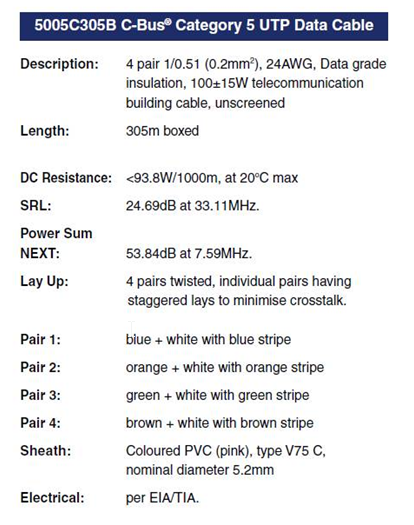
C-Bus Cable for underground
Hide ShowTypically for C-Bus underground cable use it needs to be a Cat5E UTP cable with the similar characteristics / impedance as the C-Bus 5005C305B cable.
If you use an underground CAT5E data cable from brands such as belden or garland etc
We would recommend you ask the supplier to provide confirmation they can provide a CAT5E UTP underground equivalent cable Gel filled.
Do not use shielded cabling.

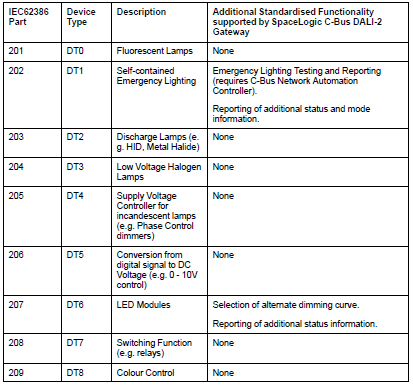
What dali device type does the C-BUS Dali2Gateway (5502CDGP230) support?
Hide ShowThe C-BUS Dali2Gateway F/W 1.8 can currently support DT0, DT1, DT6. It doe not yet support Tunable White and RGB/RGBW
Is there a firmware compatibility matrix for BMXP342020 CPUs and Unity Pro/Control Expert versions?
Hide ShowThe below table shows the firmware compatibility of the BMXP342020 across different versions of Control Expert/Unity Pro. Please note that the application version refers to the version of the firmware selected with Control Expert/Unity Pro itself rather than the actual firmware within the physical device. However, if you upgrade the firmware of the device beyond the supported application version, it is still possible to use it in Control Expert/Unity Pro, albeit with some limitations, assuming the old (and supported) application version is maintained. For example, in the below matrix you can see that the maximum supported application version for Unity Pro V6.0 is V2.3. However, if the firmware is upgraded from V2.30 to V2.40, it is still possible to use the CPU as long as the application version is maintained at V2.30.
Which version of HomeGate is compatible with C-Gate 3?
Hide ShowHomeGate V4.15.0 or later is compatible with C-Gate 3
Release note:

Download link:


How to back up Wiser2 project using Wiser Transfer Utility
Hide ShowHow to back up Wiser2 project using Wiser Transfer Utility
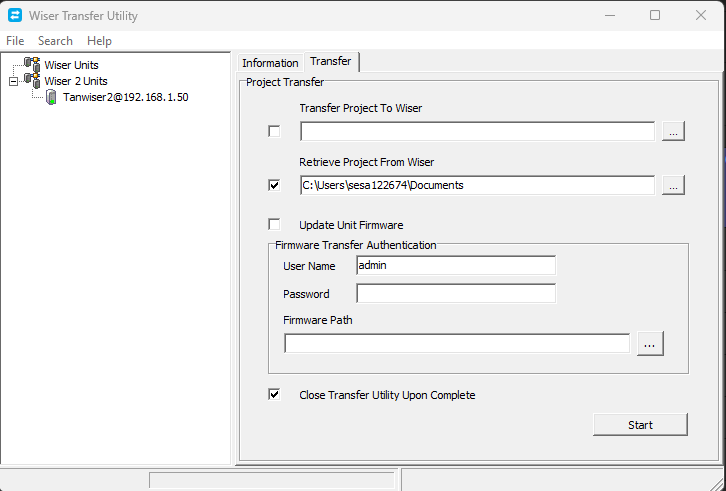
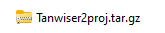
it will save the files as .tar.gz
Where to download software for the dali building monitor software package?
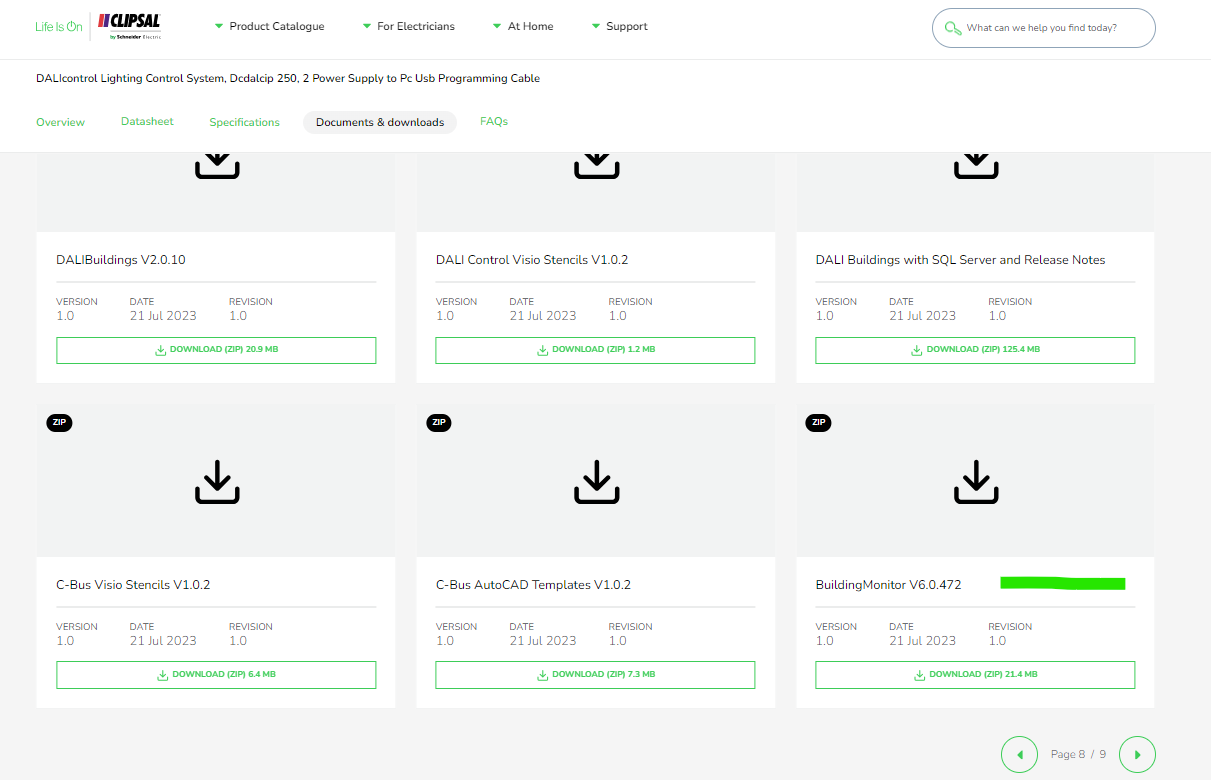
Hide Showhttps://download.schneider-electric.com/files?p_Doc_Ref=BuildingMonitor-V6.0.472
Search for DCDALCIP250-2 or DCCABKIT6 in Google

Select document & download and tick software - Release

Click through the pages and look for Building Monitor V6.0.472
Can an ATV61 preset speed be set lower than the Low speed?
Hide Show
Resolution:
Low speed (LSP) is the minimum drive running speed. You cannot set a preset speed lower than this.
Which pins or cables are associated with the 5500PS C-BUS power supply?
Hide ShowWhich pins or cables are associated with the 5500PS C-BUS power supply?
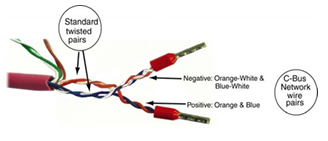
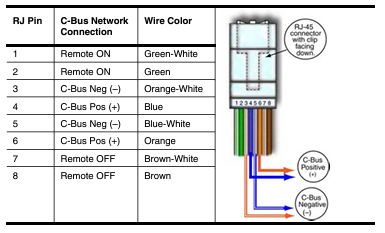
in 1-8 on the RJ45
How can you change the display screen to show different parameters on the ATV61 and ATV71 drives?
Hide ShowHow can you change the monitoring screen to show different parameters other then frequency reference on the ATV61 and ATV71 drives?
Product Line:
ATV61, ATV71.
Environment:
All model numbers, all serial numbers.
Cause:
Customer wanted to monitor output frequency and output current on the monitor screen.
Resolution:
Under Main Menu,
Go into Menu 6 Monitoring Configuration.
6.2 Monitor Screen Type to adjust the number of parameters that can be displayed and the format of display.
There are 3 options; Digital, Bar graph, and List.
Digital and Bar Graph can display up to two parameters at a time on the screen.
List displays up to 5 different parameters on the screen.
Go into Menu 6.2 Parameter Selection to select the parameters that are desired. Parameters can also be removed by removing the check mark in the box.
When you are done hit ESC to back out until you see your new display parameters.
What is Thermal Sensor Error (t1CF) on the Altivar Process 900?
Hide ShowIssue:
What is error t1CF on the Altivar Process 900?
Product Line:
Variable Frequency Drives
Environment:
Applies to Altivar Process 900
ATV930
ATV950
ATV960
Cause:
Drive displaying "t1CF" when wiring the sensor to "AI1" and "COM"
Resolution:
t1CF: AI1 thermal sensor Error
Probable Cause:
The thermal sensor monitoring function has detected a thermal sensor error on analog input AI1:
- Open circuit, or
- Short circuit
Remedy: Verify the sensor and its wiring, replace the sensor if needed
This detected error can be cleared with [Auto Fault Reset] Atr or manually with the [Fault Reset Assign] rSF parameter after the cause has disappeared.
t3CF indicates a thermal sensor connected to Analog input 3 triggered the error
t4CF indicates an AI4 thermal sensor error
t5CF indicates an AI5 thermal sensor error detected
If this article does not answer your question, check out our FAQ database that has answers to more commonly asked questions: Frequently Asked Questions - Schneider Electric (se.com)If this FAQ did not solve your issue, you can call us at 1-888-778-2733 Option 2 and then 4 or e-mail us at drive.products.support@se.com to create a case with our Technical Support Team. If you are not located in North America, please contact your local Customer Care Center for assistance: Support | Schneider Electric Global (se.com)
Vijeo Designer V6.3 ,HMI License Manager giving error when trying to open the software to license the Vijeo designer Software
Hide ShowIssue:
Encountering the subsequent HMI License Manager error while attempting to access the HMI License Manager for the licensing of Vijeo Designer V6.3
Product Line:
Vijeo Designer V6.3
Resolution:
Please delete the old HMI License Manager V1.0.0 from the following folder , "C:\Program Files (x86)\Schneider Electric\Vijeo-Designer 6.3\HMILicenseManager\
Please unzip and copy & paste , the attached HMI License Manager V1.0.3 to the above folder , then you will be to open HMI license Manager V1.0.3
C-Bus download tap not displaying in the download website
Hide ShowThe software TAB disappearing is a Browser Cache problem for SE.COM.
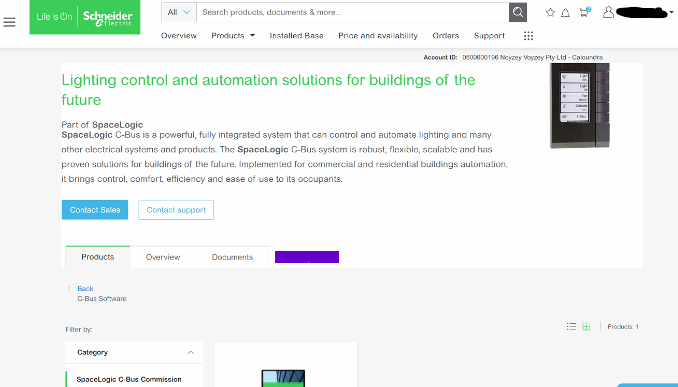 >
>It is a fairly simple fix;
This is how to clear your browser cache only for SE.com, instead of clearing all your cache info for other sites.
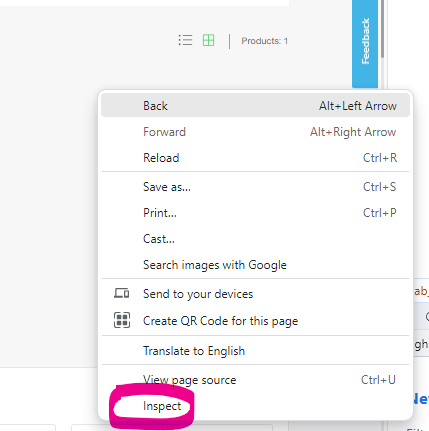
Right click> Inspect
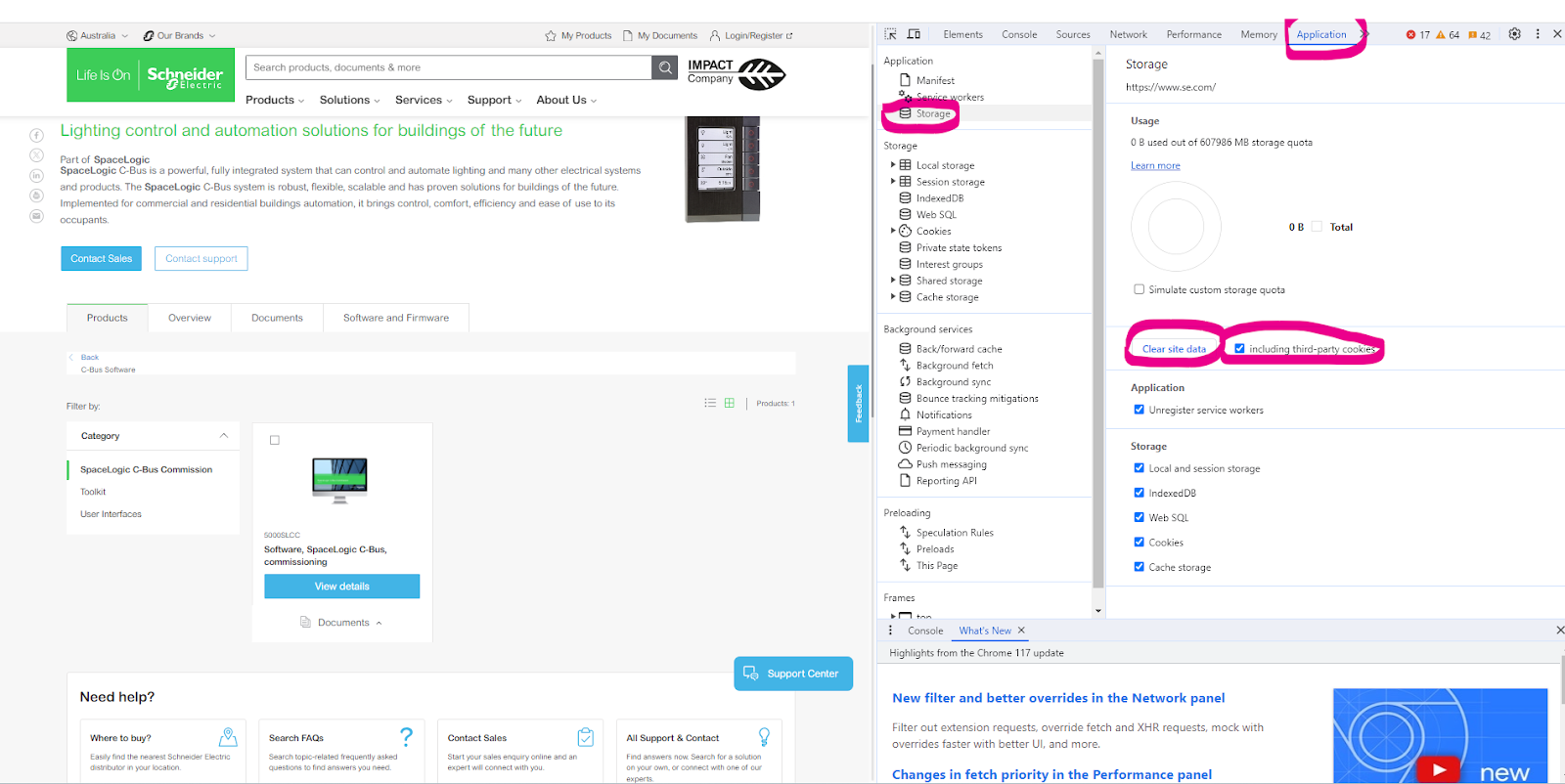
Select Application> Storage> tick including third-party cookies then hit > Clear site data
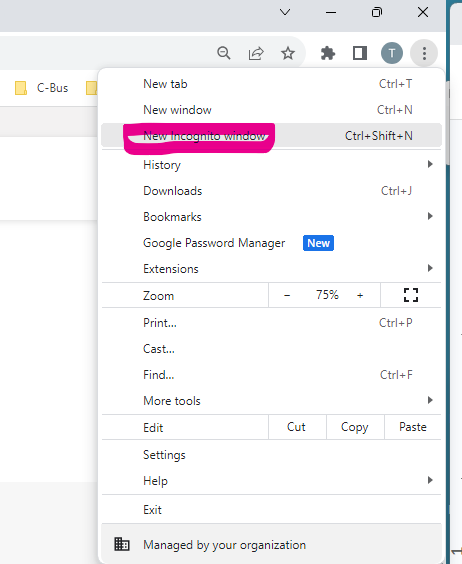
Another option is to run New Incognito window
How to change a wrong USB Driver on DCCABKIT6
Hide ShowSuppose the following happens when connecting the DCCABKIT6 cable between Laptop and DALIcontrol Duo Mode 3 Power Supply (DCDALCIP250-2).
In Device Manager find something like
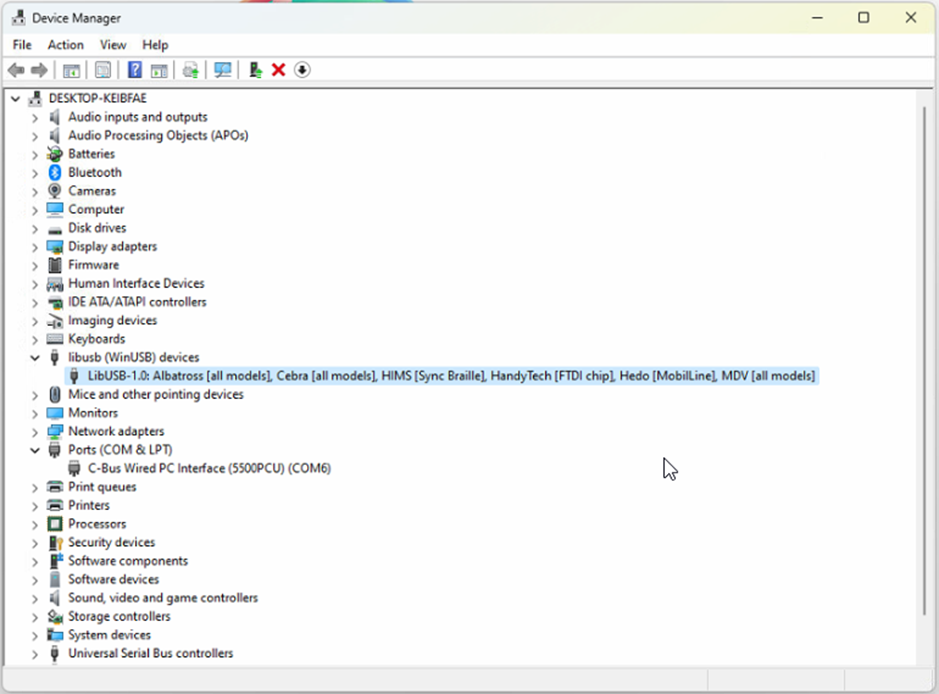
The cable has likely been used with some other product that has recognised the FDTI chip and installed this LibUSB driver which is not recognised by the Simple Wizard which sees a different device ID
BEFORE GOING FURTHER REALISE THAT ONCE COMPLETE THE OTHER DEVICE WILL NO LONGER FIND ITS REQUIRED DRIVER.
Right click on this entry in the Device Manager and select Properties from the menu
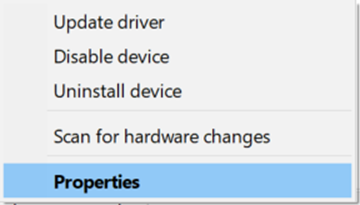
And proceed to the Driver tab

…and select <Update Driver>

… and Select <Browse my computer for Drivers>
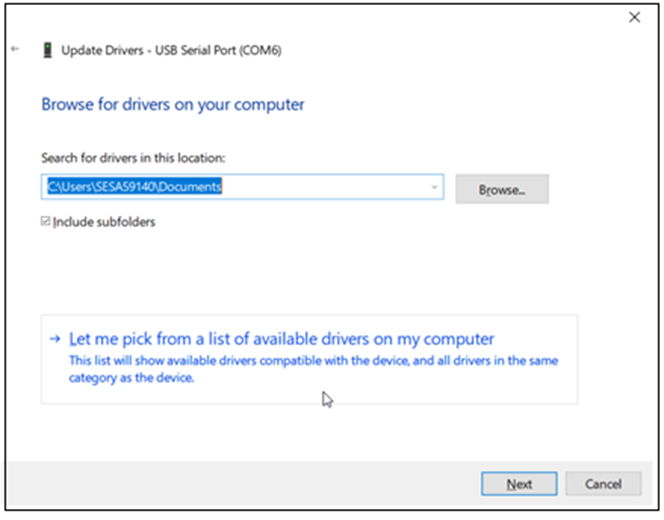
Select <Let me pick from a list of available drivers on my computer>
With this next Dialog un-tick the Show compatible hardware
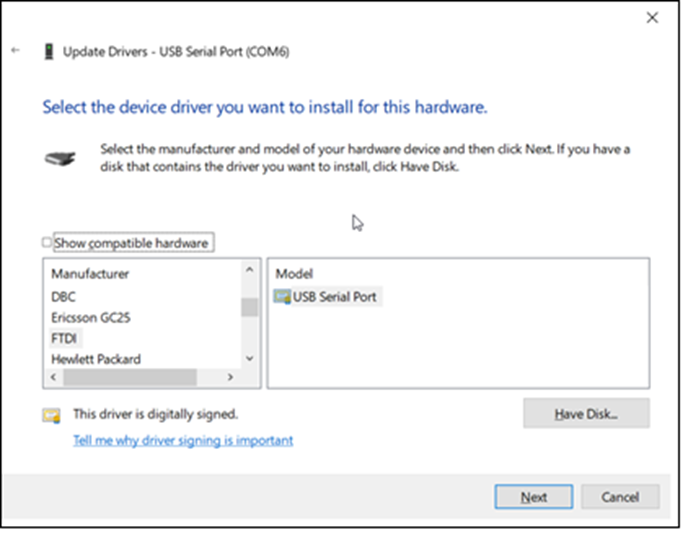
In this case you should see Manufacturer FTDI and Select from the Model USB Serial Port which should start the install finishing with…

From here you should now be able to connect.
It is important to note that when connecting to the DALIcontrol Duo Mode 3 Power Supply (DCDALCIP250-2) with the DCCABKIT6 programming cable and running DCBMWizard or SimpleWizard that the power supply be in mode 1. To achieve this on the DCDALCIP250-2 press and hold the <ON A> button and momentarily press the <TEST A> button. The Line A indicator will single pulse 5x to indicate the mode.
If there is a compatible driver installed you can try tick Show Compatible hardware, then try selecting one of the drivers below.
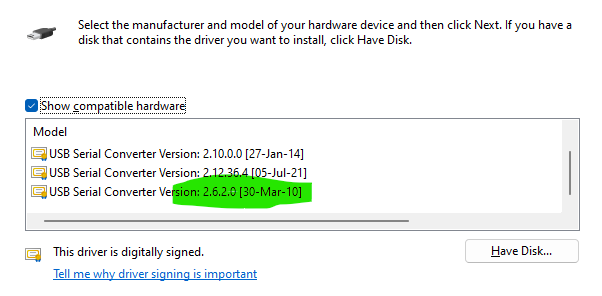
If there are no drivers to be found on the Computer in question it is then possible to download the software by going to the following on your web browser https://support.arduino.cc/hc/en-us/articles/4411305694610-Install-or-update-FTDI-drivers and follow the instructions laid out.
Also go to https://ftdichip.com/drivers/ and follow up with https://ftdichip.com/document/installation-guides/
New C-Bus relays 55xxRVFs now have a minimum load rating?
Hide ShowThe minimum load refers to the minimum voltage/current required to maintain the quality of the relay contacts.
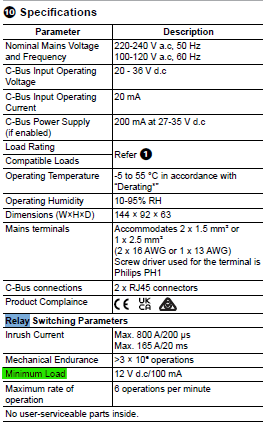
The relays are the same as used in the current C-Bus relays so there is no difference in product spec. The datasheet wanted to provide more information to the customer.
Is it possible to access and/or upload the program from a VW3A3501 Controller inside card ?
Hide ShowNo, it is not possible to access and/or upload the program from a VW3A3501 Controller inside card to a PC.
Where can I get information on RL Line Reactors, filters, and braking resistors for AC Drives?
Hide ShowRL Line Reactors, filters, and braking resistors information for AC Drives
Product Line:
RL Line Reactors, filters, braking resistors
Environment:
All serial numbers for RL Line Reactors
Cause:
N/A
Resolution:
Please contact MTE Corp for specific information on each part.
MTE CORPORATION
an SL Industries Company
N83 W13330 Leon Road. Menomonee Falls, WI 53051 USA
Toll Free: 1-800-455-4MTE
International Tel: 1-262-253-8200
Fax: 1-262-253-8222
https://www.mtecorp.com
What can cause an APF fault on the ATV61 drive?
Hide ShowAPF fault on the ATV61 drive
Product Line:
Altivar ATV61
Environment:
All with an CIC or controller inside card
Cause:
The drive will ramp up and then trip on APF fault.
Resolution:
The APF fault is a fault or error on the controller inside option card. Try swapping or replacing the controller inside card that has an identical program inside the card.
How long can the ATV630 or ATV650 motor leads be before I need an output filter?
Hide ShowATV630 and ATV650 motor leads maximum length before an output filter is required.
Product Line:
ATV630, ATV650 process drive.
Environment:
All models, All serial numbers
Cause:
Information needed to plan for installation
Resoultion:
Please see the chart below for the maximum distance of motor leads before output filtering is mandatory. Note that the distances listed are the maximum distance before output filtering is required. Output filtering may be necessary at shorter distances for your specific installation.
How do I prevent my Altivar 61 / Altivar 71 series drive from running in reverse?
Hide ShowTrying to prevent my Altivar 61 / Altivar 71 series drive from running in reverse.
Product Line:
Altivar 61 / Altivar 71 series drives.
Environment:
All models, All serial numbers.
Cause:
Customers application requires operation of the motor in one direction only. Running in reverse must be inhibited.
Resolution:
Under menu 1.5, Assign parameter "RUN REVERSE" to "NO"
Under menu 1.6, Assign parameter "RV INHIBITION" to "YES".
Please note that if you have "RUN REVERSE" assigned to a logic input, setting RV INHIBITION to YES will not prevent the drive from running in reverse,if called to by the logic input. RV Inhibition will prevent the motor from being run in reverse from the graphic display or line. Any speed reference, such as a PID reference, summing input, or any other speed reference that would normally cause the motor to run in reverse will now cause the motor to stop, when RV INHIBITION is set to YES.