




Specifications
Design
| Range | TeSys |
|---|---|
| Product or component type | switch body |
Physical
| Mounting support |
|
|---|---|
| [ue] rated operational voltage | 690 V AC 50/60 Hz |
| [ie] rated operational current | 29 A AC-23 Ue: 400 V |
| Mechanical durability | 100000 cycles |
| Electrical durability |
|
| Connections - terminals |
|
| Height | 74 mm |
| Width | 55 mm |
| Depth | 60 mm |
| Net weight | 0.2 kg |
| Standards | IEC 60947-3 |
| Product certifications |
|
| Ip degree of protection | IP20 conforming to IEC 60529 |
| Ambient air temperature for operation | -20...50 °C |
| Toxic heavy metal free | Yes |
| Mercury free | Yes |
| Rohs exemption information | Yes |
| Environmental disclosure | ENVPEP2211006EN |
| Eu rohs directive | Compliant |
Documents & downloads
-
All
-
CAD Files and Packs
-
Technical Data Catalogues
-
Environmental Disclosure
-
Installation Instruction
-
Technical illustration
-
Technical Drawing
-
Certificates (MSDS)
-
Declaration of Conformity
-
Declaration of Conformity (Sustainability)


3 poles VARIO switches disconnector, switch body base 25, 32, 40 A. - Dimensions - Technical drawing
VERSION
1.0
DATE
03 Mar 2022
REVISION
1.0
3 poles VARIO switches disconnector, switch body base 25, 32, 40 A. - Dimensions - Technical drawing
VERSION
1.0
DATE
03 Mar 2022
REVISION
1.0
UL_Certificate_TeSys Vario
VERSION
1.0
DATE
29 June 2026
REVISION
1.0
CCC_TeSys Vairo_V02&V01&V0&V1&V2
VERSION
1.0
DATE
25 Nov 2024
REVISION
1.0
DNV-GL Marine Certificate TeSys VARIO - V02-01-0-1-2-3-4-5-6 disconnection switch
VERSION
1.0
DATE
11 Mar 2024
REVISION
1.0
CB_Certificate_TeSys Vario V0&V1&V2&V02
VERSION
1.0
DATE
25 July 2023
REVISION
1.0
CSA Certificate_ TeSys Vario
VERSION
1.0
DATE
30 Dec 2022
REVISION
1.0
V2 EU RoHS Directive
VERSION
1.0
DATE
01 Jan 1900
REVISION
1.0
V2 EU RoHS Directive
VERSION
1.0
DATE
01 Jan 1900
REVISION
1.0
V2 EU RoHS Directive
VERSION
1.0
DATE
01 Jan 1900
REVISION
1.0
V2 EU RoHS Directive
VERSION
1.0
DATE
01 Jan 1900
REVISION
1.0
V2 EU RoHS Directive
VERSION
1.0
DATE
01 Jan 1900
REVISION
1.0
V2 EU RoHS Directive
VERSION
1.0
DATE
01 Jan 1900
REVISION
1.0
V2 EU RoHS Directive
VERSION
1.0
DATE
01 Jan 1900
REVISION
1.0
V2 EU RoHS Directive
VERSION
1.0
DATE
01 Jan 1900
REVISION
1.0
V2 REACh Regulation
VERSION
1.0
DATE
01 Jan 1900
REVISION
1.0
V2 REACh Regulation
VERSION
1.0
DATE
01 Jan 1900
REVISION
1.0
V2 REACh Regulation
VERSION
1.0
DATE
01 Jan 1900
REVISION
1.0
V2 REACh Regulation
VERSION
1.0
DATE
01 Jan 1900
REVISION
1.0
Frequently Asked Questions
5080CTC touch screen Repair
Hide ShowFor C-BUS 5000 CTC 6" Touch Screen Repairs - NOW Done by our JEA Technologies
please see attached RMA form for CTC touchscreen repair.
Contact detail for CTC repair is
Trevor Callaghan
Workshop Manager
JEA Technologies
M- 0404 887 463
Trevor.callaghan@jeatech.com.au

C-Bus Cable for underground
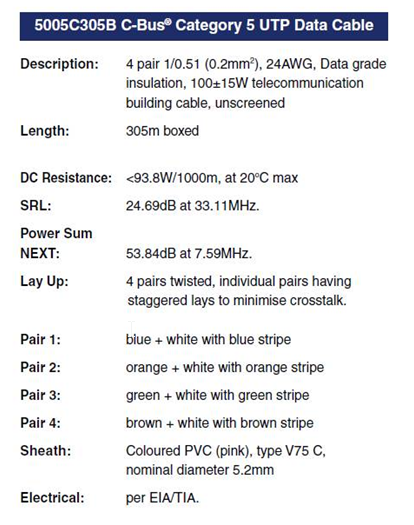
Hide ShowTypically for C-Bus underground cable use it needs to be a Cat5E UTP cable with the similar characteristics / impedance as the C-Bus 5005C305B cable.
If you use an underground CAT5E data cable from brands such as belden or garland etc
We would recommend you ask the supplier to provide confirmation they can provide a CAT5E UTP underground equivalent cable Gel filled.
Do not use shielded cabling.

Is there a firmware compatibility matrix for BMXP342020 CPUs and Unity Pro/Control Expert versions?
Hide ShowThe below table shows the firmware compatibility of the BMXP342020 across different versions of Control Expert/Unity Pro. Please note that the application version refers to the version of the firmware selected with Control Expert/Unity Pro itself rather than the actual firmware within the physical device. However, if you upgrade the firmware of the device beyond the supported application version, it is still possible to use it in Control Expert/Unity Pro, albeit with some limitations, assuming the old (and supported) application version is maintained. For example, in the below matrix you can see that the maximum supported application version for Unity Pro V6.0 is V2.3. However, if the firmware is upgraded from V2.30 to V2.40, it is still possible to use the CPU as long as the application version is maintained at V2.30.
Modicon M258 stuck in a boot loop after a firmware update?
Hide ShowQuestion:
A Modicon M258 controller powers up, all LEDs turn on briefly, RUN/MS flashes or turns off, and the Ethernet LEDs continue flashing red/green in a repeating 3-flash cycle. What can cause this boot loop and how can it be recovered?
Answer:
This behaviour could occur if the firmware loaded into the Modicon M258 is not compatible with the controller hardware version.
For M258 PV16 / hardware version 4 controllers, the required firmware depends on the SoMachine version being used:
- SoMachine V3.x: firmware V2.0.31.40
- SoMachine V4.x: firmware V4.0.3.6
Using an incompatible firmware version can cause the controller to reboot continuously and fail to complete startup.
The recommended recovery method is to reload the correct firmware using a USB memory key. Firmware update by USB key is preferred because older versions of Controller Assistant may not check the M258/LMC058 hardware version before downloading firmware. This can allow an incompatible firmware version to be loaded.
After the correct firmware has been reloaded:
1. Reconnect to the controller using the appropriate SoMachine version.
2. Download the correct application.
3. Update the boot application.
4. Power cycle the controller and confirm that the controller starts normally.
If the controller remains in a boot loop after reloading the correct firmware by USB key, and the correct firmware version for the hardware has been confirmed, no further recovery action may be available. In this condition, the controller may be permanently damaged and require replacement.
References:
- For USB firmware reload procedure, refer to Schneider Electric FAQ FA339601.
- For setting the M258/LMC058 to start in RUN mode and updating the boot application, refer to Schneider Electric FAQ FA243994.
Which wizards are supported by Global Programming in C-Bus Commission?
Hide ShowAs of C-Bus Commission v2.15.0 the following wizards are supported in Global Programming:
- C-Bus Application 1, 2, 3 & 4
- C-Bus Dimmer Min/Max Levels
- Status Report
- Blocks and Widgets Timer Expiry Time/Duration
- Status Report
- C-Bus Clock
- Local Toggle Enable/Disable
- C-Bus Priority Enable/Disable
- Shutter Relay Fail Safe Duration
- Shutter Relay Operating Mode
Can I control a group on a live C-Bus Network in C-Bus Commission?
Hide ShowA group address on a live C-Bus Network can be turned on, off or flashed; however, you need to be using C-Bus Commission v2.15.0 or higher
A group's level/action selector can also be set in a similar manner:
Will the Manager Plugin UI scale for a Schneider 10" IP Touchscreen or a 10" iPad?
Hide ShowAs of C-Bus Controller firmware v2.5.0 the UI generated by the Manager Plugin will scale appropriately
Which project types can be imported into C-Bus Commission?
Hide ShowAs of SpaceLogic C-Bus Commission v2.15.0, projects of file types: *.c2z, *.cbz and *.xml can be imported as a C-Bus Project
How can I update the firmware of an eDLT to v2.X?
Hide ShowA firmware upgrade of an eDLT to v2.X can only be done in C-Bus Commission; however, the eDLT must support hardware v3.0.
Some key points to remember when performing a firmware upgrade using C-Bus Commission:
• In C-Bus Toolkit, you can only upgrade an eDLT’s firmware up to v1.8
• Once you upgrade the firmware to v2.X, you cannot revert to an earlier version
• A firmware upgrade to v2.X will factory reset the unit; the device will need to be re-programmed
Can I program the properties of an eDLT using C-Bus Commission?
Hide ShowSpaceLogic C-Bus Commission v2.15.0 or higher supports the capability to program eDLT's with the following characteristic:
Hardware: v3.0
Firmware: v2.X
What different scans can be performed on the DALI Line in C-Bus Commission?
Hide ShowAs of C-Bus Commission v2.15.0, the available scans for a DALI are:
1. DALI Scan
2. DALI Device Type Scan
3. Read DALI Gateway
4. Discover Faults
Note: A Scan can also be done by pressing the INSTALL button of each line on the front of the unit
Where to download the SpaceLogic C-Bus Commission V2.2.0?
Hide ShowRelease Date: 02/04/2024
Version: V2.2.0
Reference: C-Bus-Commission_V2.2.0
C-Gate: 3.3.0 (build 1825)
Operating systems: Windows 11 Professional (64-bit), Windows 10 Professional (64-bit), Windows 10 Enterprise (64-bit), Windows 10.
What’s New
• Dimmer conversion will add default channel name
When converting older LE dimmers DIMDN4 or DIMDN8 (L5504D2A or L5508D1A) to the new digital dimmers DIMDD4 (5504D2D) and DIMDD8 (5508D1D), the software will now automatically insert a default channel name per channel.
• Network Summary for a C-Bus Network
The C-Bus Network node will show the summary of network information and status including the C-Bus Current supplied and consumed values plus the network impedance value. This data is only taking the project devices into consideration (not the live network devices).
• View the in-built C-Bus power supply status of C-Bus Digital Dimmers on the live network
An icon has been added to the Status column in the Network Devices section of the C-Bus Devices workspace indicating whether the in-built C-Bus Power Supply for the new C-Bus Digital Dimmer (DIMDD4 and DIMDD8) is enabled or disabled.
Fixes
• Project conversion issues. The software will now show correctly when a project has truly failed to convert. Issue with projects in “Waiting” resolved.
• Multiple confirmation dialogues when delete a device in project.
• When transferring to a C-Bus Automation Controller and C-Bus Application Controller, updating a Tag Map name will create an Object if one does not exist, this can result in additional objects created in controller that were not defined in the Object List. Note, this release of SpaceLogic C-Bus Commission software is only compatible with the C-Bus Automation Controller and C-Bus Application Controller firmware version 1.16.0 (when using the Controller Sync function).
• Warn Before Off Enable Group in live network Digital Dimmer is blank and not auto created during a network scan.
• Network burden property of Digital Dimmers did not update the C-Bus summary data (not included in network calculator).
Known Issues
• A slight delay may be seen when switching views back and forth between the Measurement and Error applications where a large amount of data (150 items or more) exists.
• Clicking on the Main Menu repeatedly will result in a decrease in software performance. C-BUS COMMISSION RELEASE NOTES 2
• Switching projects 10 or more times will result in a decrease in software performance.
• Measurement application values presented from the live network may not appear truncated and rounded to reasonable decimal places.
Link to download the SpaceLogic C-Bus Commission V2.2.0
https://www.se.com/nz/en/download/document/C-Bus-Commission_V2.2.0/
or
https://www.se.com/au/en/product-range/2216-spacelogic-cbus-home-automation-system/?parent-subcategory-id=88010&filter=business-5-residential-and-small-business#software-and-firmware
What do the terms PWH1 I1 and PWH1 V1 mean in the Power Harmonics module?
Hide ShowProduct Line: ION 9000 Power meters
Environment: METSEION92030
Resolution:
Explanation of Power Harmonics Angle Parameters
The parameters PWH1 V1/V2/V3 Angle and PWH1 I1/I2/I3 Angle are sourced from the Power Harmonics module under the Fundamental Power group. These parameters represent the phase angles, measured in degrees, of voltage and current for each phase at the fundamental frequency.
- PWH1 V1 Angle → Phase angle of Voltage Phase A
- PWH1 V2 Angle → Phase angle of Voltage Phase B
- PWH1 V3 Angle → Phase angle of Voltage Phase C
- PWH1 I1 Angle → Phase angle of Current Phase A
- PWH1 I2 Angle → Phase angle of Current Phase B
- PWH1 I3 Angle → Phase angle of Current Phase C
These values are commonly used for power quality analysis and phase relationship verification at the fundamental frequency.
How to update M580 PLC project firmware from Version 1.1 to SV 2.0?
Hide ShowIssue:
When trying to update the M580 PLC firmware in Control Expert from version 1.1 to SV2.x or later , we are getting the following errors ,
Product Line:
M580 PLC Range .
Resolution:
Please Export the project file (that has got M580 Project firmware as SV 1.1) to .ZEF and then please search for M580 CPU Change V1V2 Software from Windows Search bar (this software is an Add-ons that comes along with Control Expert) and open the software.
Please import the .ZEF file and click Next and the Converted application will be automatically saved to location in which the previous firmware version file located . The converted application will have a following words added to application name "L2"(for example : Test_L2.ZEF)
Full Installation & Initial Setup Process for EcoStruxure Machine Expert (EME) v2.5
Hide ShowFAQ question:
How do I install EcoStruxure Machine Expert, access the configurator, complete the initial login, and proceed with creating a new user and project?
FAQ answer:
Below is the complete step‑by‑step procedure, starting from downloading the installer all the way to accessing the SecurityAdmin page and creating your own user account.
1. Download the Schneider Electric Software Installer
Begin by downloading the Schneider Electric Software Installer, which is the official installer package that manages Machine Expert and all related components.
2. Launch the Software Installer
When you run the installer, it will:
- Allow you to select which version 2.5 of EcoStruxure Machine Expert
- Provide options to install, repair, or uninstall existing Machine Expert versions
- Install any additional required modules for your configuration
Complete installation and exit the installer once all selected components finish installing.
3. Open the EcoStruxure Machine Expert Configurator
After installation:
- Locate “EcoStruxure Machine Expert Configurator” in the Start Menu.
- Launch it.
This will open a dialog box that displays an internal URL (typically a localhost address) where the initial setup is performed.
4. Open the Provided URL to Access the Login Page
The configurator will show a link such as:
"https://localhost:_________"
Clicking or entering this URL into your browser opens the Machine Expert Web Admin login page.
5. Log In Using the Default Security Reset Credentials
At first startup, Machine Expert requires logging in with the factory reset credentials:
Username: SecurityAdmin
Password: AAAAAAAA
You will be prompted to reset the password immediately.
6. Reset the Password to Your Own Admin Password
Enter the following:
- Old password: AAAAAAAA
- New password: (your preferred password)
- Retype new password: (must match above)
This completes the initial login and security reset.
After password reset, you will be taken to the SecurityAdmin dashboard, where all remaining setup steps are performed.
7. Navigate to “User Management”
Once on the SecurityAdmin landing page, select User Management on the left menu.
8. Create a New User Account
Fill in all user details to create your own permanent login.
Assign all required roles to make the account a full administrator.
Save the new user profile.
9. Log Out and Log In with Your New Credentials
Your newly created account becomes your primary admin credentials.
Log out and sign back in using your new username and password.
10. Access the Main Admin Interface
After logging in, you will see your new user’s admin dashboard, which allows you to create and manage Machine Expert applications.
11. Create a New Automation Solution
Click “New Automation Solution” to begin project creation.
12. Create or Import a Machine Expert Application
Inside the new solution:
- Click the ( + ) button
- Choose Create Machine Expert Application or Import Existing Project
13. Configure Application Details
Provide:
- Application name
- Desired Machine Expert version
- Whether to launch now or later (via the 3‑dots menu)
14. Begin Configuring Your Project
Once the application launches, configure hardware, devices, and logic based on your project requirements.
What standard does the plug used on the EVlink station meet? What cars will it work with?
Hide ShowIssue:
What connector is used on the EVlink charging station?
Product Line:
PTEVC - ELECTRICAL VEHICLE
Resolution:
The EVlink Level 2 charging stations use the SAE J1772 type connector. The J1772 plug is rated NEMA 3S and is designed for indoor or outdoor use.
Wiser2 apps Security Update notice
Hide Show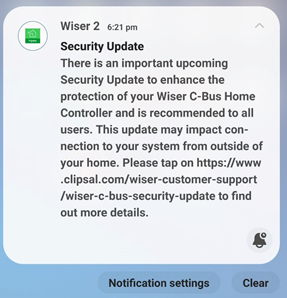
|
|
Dear SpaceLogic C-Bus Community, We want to notify you about a critical security update for the Wiser 2 app. This update will affect users as the app will no longer support the unsecured Remote Connection feature, which allows connection to the mobile app from outside the home. Users of the Wiser 2 app will receive a push notification about this update in early January 2024, and the new app with the security update will be available for download in February 2024. This update impacts Wiser 1, Wiser 1.5, Wiser MK II, and SpaceLogic C-Bus Home Controller users, with actions varying depending on the controller installed in the system. The push notification that will be sent to Wiser 2 app users in early January, will guide them to a non-indexable web page for details based on the controller they have in their installations. Please refer to the following link for more information: https://www.clipsal.com/wiser-customer-support/wiser-c-bus-security-update We kindly request that you disseminate this information to your customer support teams. Thank you, |
Why does the Unit Indicator on C-Bus output units i.e L5512RVF/L5508D1A flashing?
Hide ShowThis indicator shows the status of the individual unit. A continuous green light (OK) indicates the mains power is connected. If the indicator is flashing it means that any one of the four channels has been toggled (using the override facility) into a state different to the C-Bus network.
If any of the output channels have been toggled (using override facilities) into a state other than is present on the C-Bus network, this indicator will flash with a 90% on duty cycle.

How to change a wrong USB Driver on DCCABKIT6
Hide ShowSuppose the following happens when connecting the DCCABKIT6 cable between Laptop and DALIcontrol Duo Mode 3 Power Supply (DCDALCIP250-2).
In Device Manager find something like
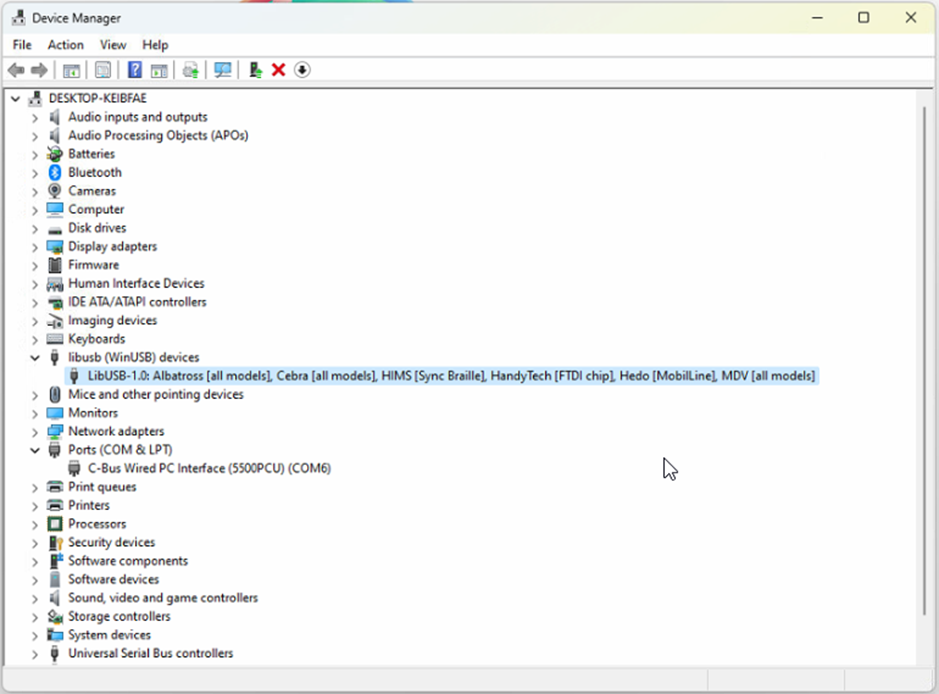
The cable has likely been used with some other product that has recognised the FDTI chip and installed this LibUSB driver which is not recognised by the Simple Wizard which sees a different device ID
BEFORE GOING FURTHER REALISE THAT ONCE COMPLETE THE OTHER DEVICE WILL NO LONGER FIND ITS REQUIRED DRIVER.
Right click on this entry in the Device Manager and select Properties from the menu
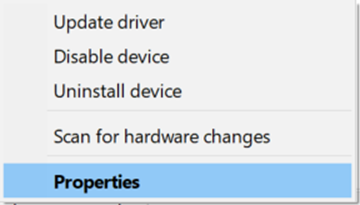
And proceed to the Driver tab

…and select <Update Driver>

… and Select <Browse my computer for Drivers>
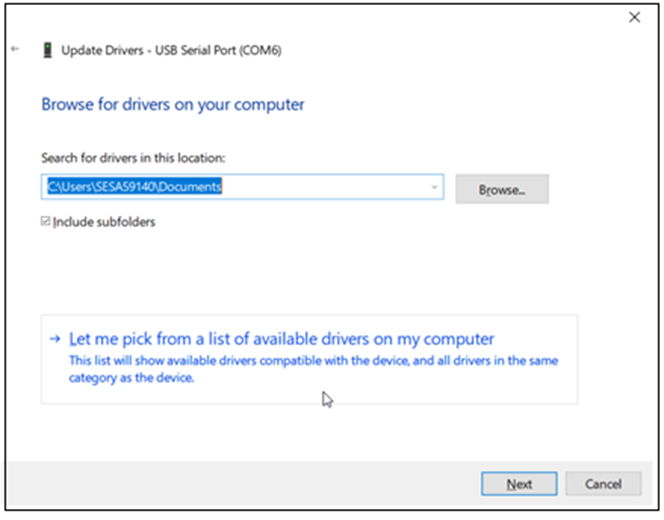
Select <Let me pick from a list of available drivers on my computer>
With this next Dialog un-tick the Show compatible hardware
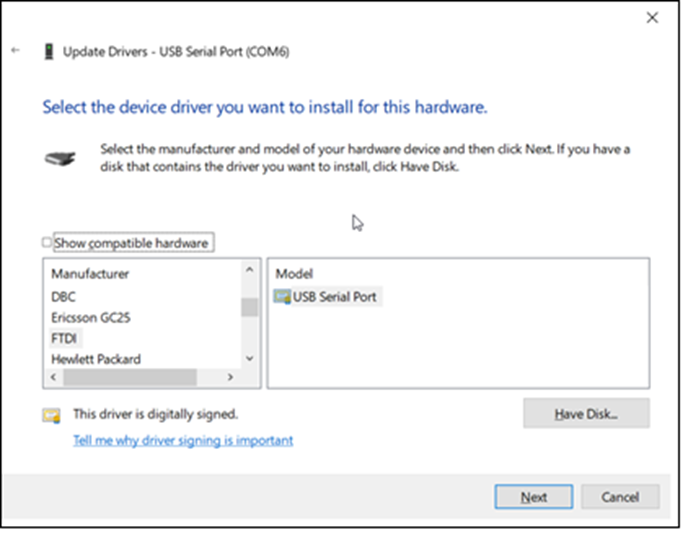
In this case you should see Manufacturer FTDI and Select from the Model USB Serial Port which should start the install finishing with…

From here you should now be able to connect.
It is important to note that when connecting to the DALIcontrol Duo Mode 3 Power Supply (DCDALCIP250-2) with the DCCABKIT6 programming cable and running DCBMWizard or SimpleWizard that the power supply be in mode 1. To achieve this on the DCDALCIP250-2 press and hold the <ON A> button and momentarily press the <TEST A> button. The Line A indicator will single pulse 5x to indicate the mode.
If there is a compatible driver installed you can try tick Show Compatible hardware, then try selecting one of the drivers below.
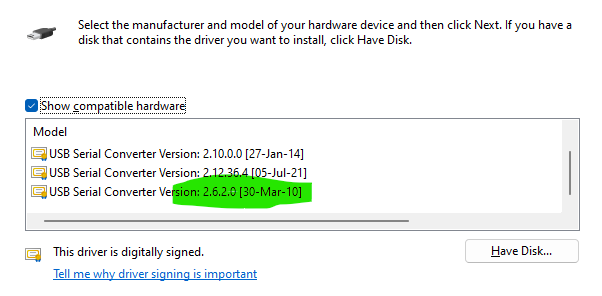
If there are no drivers to be found on the Computer in question it is then possible to download the software by going to the following on your web browser https://support.arduino.cc/hc/en-us/articles/4411305694610-Install-or-update-FTDI-drivers and follow the instructions laid out.
Also go to https://ftdichip.com/drivers/ and follow up with https://ftdichip.com/document/installation-guides/
Can C-Bus Cable 5005C305B/5005C305BST be run parallel to 240V cables?
Hide ShowFor best noise immunity, the C-Bus cable should be segregated from the mains cable in C-Bus installations. Failure to comply with all the appropriate C-Bus wiring rules may void or reduce the warranty on a C-Bus installation.
No it's not advice to run parallel to main.


Location toolkit and SLCC is downloaded from the Schneider Electric Software Updater
Hide ShowThe download toolkit and SLCC .exe files can be found in
C:\Users\Public\Downloads\Schneider Electric\SoftwareUpdate\Downloads\6ce72c98-97d0-41cf-8a8c-caf2ee993340


VIDEO - How to Interconnect a Smoke Alarm 755LPSMA4?
Hide Show►Learn More: https://www.clipsal.com
Ecostruxure Machine Expert Showing Untrusted Digital Signature
Hide ShowIssue:
Ecostruxure Machine Expert doesn’t work as normal ,after a Windows Update and keeps on getting the following message ,
Product Line:
Ecostruxure Machine Expert
Resolution:
The integrity check was triggered by new Signed Certificates related to the Windows update.
This has no effect on the used applications , if you Click the "Continue using Netmanage Server".
Till Machine Expert V2.3 this will be triggered because the new certificates are not in our whitelist and from Machine Expert V2.3 this issue will not be present.
For versions before V2.3, the integrity check could be silenced (e.g. LogicBuilder "C:\Program Files\Schneider Electric\EcoStruxure Machine Expert\V2.2\LogicBuilder.exe" --SignatureVerificationWarningLevel=Silent) for ESME or other tools like Diagnostics, Controller Assistant and also Netmanage, see also
https://product-help.schneider-electric.com/Machine%20Expert/V2.2/en/SoMProg/index.htm#t=SoMProg%2FD-SE-0108425.html
But if Netmanage is not running as a Windows Service, then you have to uninstall the Windows-Service and Start manually to start Netmanage in silent mode until Machine Expert V2.3
From ESME V2.3 it's also possible to run the Netmanage service in silent mode by setting the Config file
Where to download the C-Bus PICED 4.14.2?
Hide ShowDate: 29/06/2023
Version: V4.14.2
Reference: PICED-V4.14.2
Operating Systems: Windows 10, Windows 7, Windows 8, Windows Vista, Windows x86 / x64
It contains C-Bus Wiser 2 firmware V1.33.1 and C-Bus Home Controller firmware V2.01.1
https://www.se.com/za/en/download/document/PICED-V4.14.2/
Modicon M262 Error message "The device is not ready for Encrypted Communication" .
Hide ShowIssue:
When trying to connect using Controller Assistant or Machine Expert logic builder , TM262 is giving "the Device is not ready for encrypted communication" .
Product Line:
M262 Product Line.
Machine Expert Logic Builder .
Please try the below Workarounds to see whether you can connect to Modicon TM262 PLC ,
(1). As per Machine Expert V2.3 Release notes there has been Bug Reported and the workaround is , Deselect the option Encrypted Communication in communication Settings under Device Tree Tab in Controller Selection mode of the Ecostruxure Machine Expert Logic Builder
(2). If the issue still persists after De-selecting the Encrypted Communication (as per workaround (1)) then please follow the below notes ,
As per Machine Expert V2.3 Release Notes there has been a Bug reported , Login with encrypted communication to the Modicon M262 controller is not possible after updating the firmware to V2.2.2. Due to a change in certificate handling in EcoStruxure Machine Expert V2.2.2, encrypted communication does not work when you reuse the previous version of the certificate after upgrade to V2.2.2.
Workaround: Delete the existing certificate by using the Security Screen editor or perform an SD card upgrade to V2.2.2.
If two electric vehicles are connected to a dual outlet EVlink charging station and one has completed charging and is disconnected, will the other vehicle continue to be charged?
Hide ShowWill charging continue on a dual EV station when one outlet is unplugged?
Product Line:
PTEVC - Electric Vehicle Systems
Environment:
Dual EV charging stations
Cause:
Concern about continuous charging
Resolution:
Yes, once a vehicle has stopped charging and has been disconnected, the other side of the dual charger will remain energized and continue charging the other vehicle until it has stopped charging and has been disconnected.
How to set a Static or Fixed IP, for 5500CN2 C-Bus Network Interface
Hide Show
Assuming that it's powered up and connected to the same network where your PC is connected to.
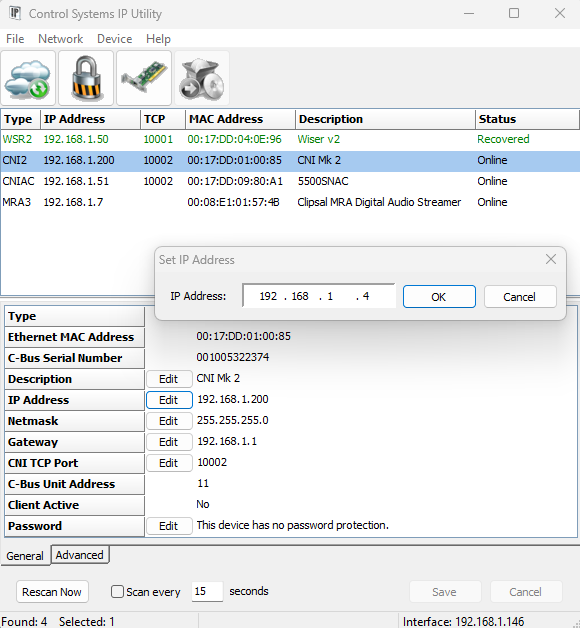
Assuming that you have installed Toolkit software where C-Bus Control System IP Utility is also installed.
- From start menu run the C-Bus Control System IP Utility
- Select the Cloud Icon to scan for C-Bus network interface
- Select the C-Bus network interface you wish to specify the static IP address for
- Select the edit button and type the desired static IP address and click ok
- The new IP address will be showing in red
- Hit the save button will apply the change and the C-Bus network interface will reboot and shall now have the new IP address
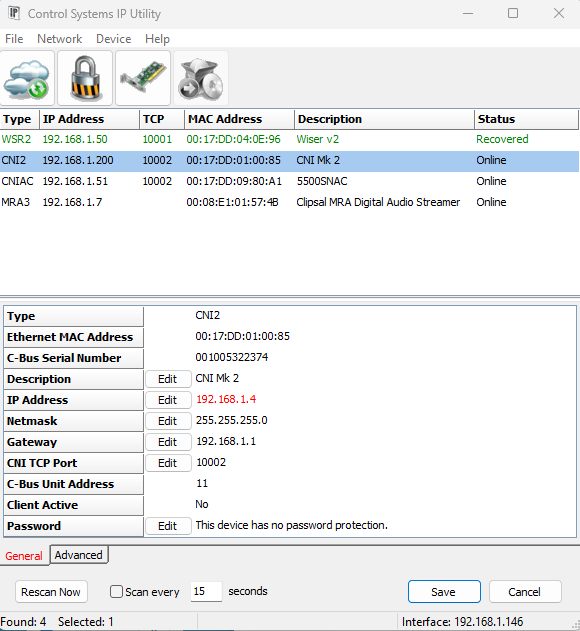
Which version of SpaceLogic C-Bus Commission (SLCC) can export projects in xml format?
Hide ShowSLCC V2.6.0 or later
How Do You Make a Clipsal Warranty Claim?
Hide ShowPlease complete the warranty claim form and one of our service agents will get in contact with you.
Please note:
By submitting this Warranty Claim form you are agreeing that the product is Clipsal brand and that if no fault is found with the product, or not within the warranty period, you may be charged by the Service Agent, for time, parts and labour costs. If you’re unsure if your product is faulty you can contact our Technical Support Team or via phone on 13 73 28.
Video: How can you program the ATV212 drive to run in local mode?
Hide ShowATV212 drive needs to run in local mode
Product Line:
Altivar ATV21 and ATV212
Environment:
All
Cause:
Needs to use the run/ stop buttons on the face of the drive.
Resolution:
Programming as follows using the integral display
If you would like to be able to switch back and forth between local mode and remote mode, the LOC/REM button can be used.
This button has a green LED in it. When you press the button, the the LED lights up, and the drive is in local mode. Press the button again to turn off the LED and place the drive back into remote mode.
Otherwise, program the drive as follows:
Push the Mode button until you see AUF
Once at AUF, do not push the ENT button, just arrow down to parameter CNOD. Push the ENT buttons and change this value 1 (keypad), then push the ENT button again to save.
Arrow up to parameter FNOD. Push the ENT button and change the value to 3 (keypad), then press the ENT button again to save.
Push the Mode button until you see FR-F. This is the display menu. Push the Mode button one more time to go back to the default display (Reference Frequency).
See the ATV212 Programming Manual and below video for additional details.