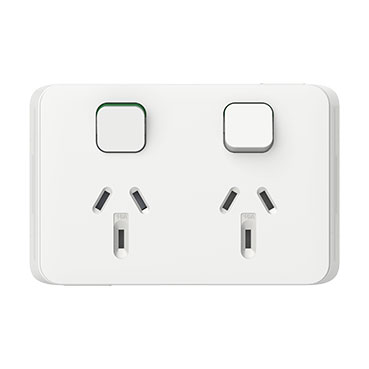

Clipsal Iconic Double Switch Power Point Horizontal Mount, 250V, 10A | Vivid White
Item Number: 3025-VW
The Iconic Double Power Point has a Grid Plate with innovative protective flaps, which help prevent screw access after installation (by a qualified electrician); which means skins can be changed safely at any time.



Specifications
Design
| Range | Clipsal Iconic |
|---|---|
| Product or component type | switched socket |
| Surface treatment | untreated |
Physical
| Device presentation | complete product |
|---|---|
| Socket number | 2 |
| Connections - terminals | screw terminals |
| Installation direction | horizontal |
| Device mounting | flush |
| Number of rocker | 2 |
| Rated current | 10 A |
| [ue] rated operational voltage | 230/240 V |
| Fixing mode | by screws |
| Clamping connection capacity |
|
| Wire stripping length | 16 mm |
| Net weight | 116 g |
| Ambient air temperature for operation | 0...45 °C |
| Height | 78 mm |
| Width | 120 mm |
| Depth | 27 mm |
| Toxic heavy metal free | Yes |
| Mercury free | Yes |
| Rohs exemption information | Yes |
| Environmental disclosure | ENVPEP1607004EN |
| Eu rohs directive | Compliant |
| Quantity per set | set of 10 |
Documents & downloads
Filter items
-
All
-
Product Brochures
-
Technical Data Catalogues
-
Environmental Disclosure
-
Certificates (MSDS)
-
eTechPub
-
Declaration of Conformity (Sustainability)

ZIP
3025-VW EU RoHS Directive
VERSION
1.0
DATE
01 Jan 1900
REVISION
1.0
ZIP
3025-VW EU RoHS Directive
VERSION
1.0
DATE
01 Jan 1900
REVISION
1.0
ZIP
3025-VW REACh Regulation
VERSION
1.0
DATE
01 Jan 1900
REVISION
1.0
ZIP
3025-VW REACh Regulation
VERSION
1.0
DATE
01 Jan 1900
REVISION
1.0
ZIP
3025-XW EU RoHS Directive
VERSION
1.0
DATE
01 Jan 1900
REVISION
1.0
ZIP
3025-XW EU RoHS Directive
VERSION
1.0
DATE
01 Jan 1900
REVISION
1.0
Frequently Asked Questions
How do I swap my Wiser connected socket outlet from BLE to Zigbee?
Hide Show
If the Socket is currently paired with Wiser by SE, remove/delete the socket from the App. Go to the Bluetooth settings on your phone/device and forget the socket that you just removed from the App.
Download the Wiser Room App, if you don’t have it on your smart device, and open it. Within Wiser Room tap Edit at the top right and select ‘Add New Device’. Follow the instructions and pair your socket with Wiser Room. Once paired in Wiser Room, tap on the socket and then tap on the cog to enter the settings of the device. Tap on Advanced Settings, tap on Device Information and then proceed to update the Firmware of the socket.
Once the firmware update is completed and you can re-connect to the device once again check to make sure there are no more firmware updates. Once confirmed remove the socket from Wiser Room App by tapping Edit in the top right and then delete the device. Open the Bluetooth settings on your phone and once again remove the socket from here.
To then swap the socket from Bluetooth to Zigbee tap the touch switch LED panel 12 times. When the swap is completed you will see both the left and right LED on the panel blinking together indicating you are in Zigbee mode. Tap the touch switch panel to stop the blinking.
In Wiser by SE, go to the home you wish to add the socket to and tap the plus symbol in the top right corner. Go to the Add with Hub option and select the Iconic Socket and follow the instructions, tap the LED panel 3 times as per the animation and confirm that both LED’s on the panel are flashing.
Download the Wiser Room App, if you don’t have it on your smart device, and open it. Within Wiser Room tap Edit at the top right and select ‘Add New Device’. Follow the instructions and pair your socket with Wiser Room. Once paired in Wiser Room, tap on the socket and then tap on the cog to enter the settings of the device. Tap on Advanced Settings, tap on Device Information and then proceed to update the Firmware of the socket.
Once the firmware update is completed and you can re-connect to the device once again check to make sure there are no more firmware updates. Once confirmed remove the socket from Wiser Room App by tapping Edit in the top right and then delete the device. Open the Bluetooth settings on your phone and once again remove the socket from here.
To then swap the socket from Bluetooth to Zigbee tap the touch switch LED panel 12 times. When the swap is completed you will see both the left and right LED on the panel blinking together indicating you are in Zigbee mode. Tap the touch switch panel to stop the blinking.
In Wiser by SE, go to the home you wish to add the socket to and tap the plus symbol in the top right corner. Go to the Add with Hub option and select the Iconic Socket and follow the instructions, tap the LED panel 3 times as per the animation and confirm that both LED’s on the panel are flashing.
How do I convert Iconic Wiser™ Connected Socket from Zigbee to BLE
Hide ShowSee below video
What is the IP rating for the Iconic Outdoor sockets?
Hide Show
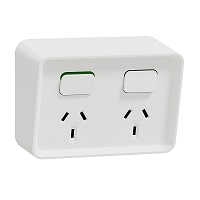
All Iconic Outdoor sockets have a rating of IP54.
Do the conduit caps come with the Iconic Outdoor?
Hide Show
No, the conduit caps are supplied separately and come in two sizes 20mm and 25mm.
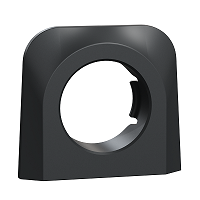
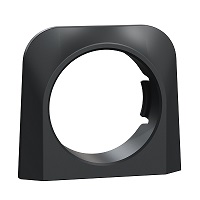
How do you remove the cover from Iconic Outdoor once its clipped on?
Hide Show
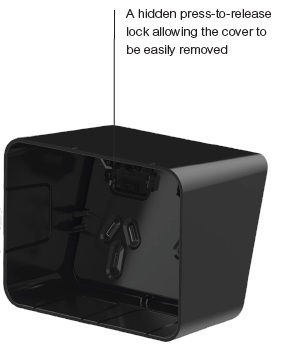
To remove the cover from Iconic Outdoor, push down on the top middle of the cover and pull away from wall.
Does the Iconic Outdoor socket maintain IP54 when a plug is inserted?
Hide Show
Although there is no requirement within Australian Standards to test the IP rating when a plug is inserted into a socket, we recommend using a sealed plug or socket such as 56 Series in wet environments.
Does the Iconic outlets fit the Tal Plus skirting duct?
Hide Show
No, the Iconic outlets will not fit in the Tal Plus skirting duct.
The power shrouds (PLPSK) are not large enough for the back of the outlet to fit in.
The power shrouds (PLPSK) are not large enough for the back of the outlet to fit in.
Do I need to use any caps or silicone on the mounting screws on the Iconic Outdoor?
Hide Show
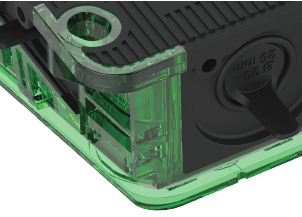
All Iconic Outdoor mounting points are outside the wiring area and do not need to be drilled or any additional sealant applied.
What size conduit entries can be used with Iconic Outdoor?
Hide Show
Iconic Outdoor suits both 20mm and 25mm conduit.

What shroud would fit the 3025USBC?
Hide Show
The shroud that suits the 3025USBC is the 90BI-BK.

What colours are the new Iconic Outdoor Products available in?
Hide Show
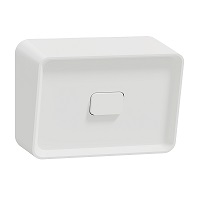
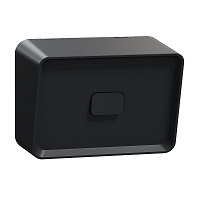
Iconic Outdoor is available in Matte White -XW and Matte Black -BK.