

DALIcontrol Lighting Control System Din-Mount Power Supply & Serial Interface Two Dali lines
Item Number: DCDALCIP250-2
The DALI Control Din-Mount Power supply provides power for two DALI lines for your DALI lighting requirements. The power supply features indicators to show when power is operational.
Datasheet

Specifications
Design
| Range of product | DALI Control |
|---|---|
| Range | DALI Control |
| Product brand | Clipsal |
| Product or component type | dual power supply and serial interface |
| Device application |
|
Physical
| Output current | <= 235 mA |
|---|---|
| Output current | <= 235 mA line |
| Local signalling | LED |
| Mounting support | DIN rail |
| Reach free of svhc | Yes |
| Toxic heavy metal free | Yes |
| Mercury free | Yes |
| Rohs exemption information | Yes |
| Environmental disclosure | ENVPEP2303029_V1 |
| Eu rohs directive | Compliant |
Documents & downloads
-
All
-
CAD Files and Packs
-
Product Brochures
-
Other technical guide
-
Specification Guide
-
Application Notes
-
Certificates (MSDS)
-
Declaration of Conformity (Sustainability)
-
Software - Release
-
Software - Data Library
Plug & Play Solution - DALIinfinity Soft Wiring 5 Pole, 24678
VERSION
1.0
DATE
29 Sept 2023
REVISION
1.0
Think differently about lighting control. DALIcontrol 30 Series Mech Range, 151007
VERSION
1.0
DATE
29 Sept 2023
REVISION
1.0
DALIcontrol - Commercial Offices and Emergency and Exit Light Monitoring, 24576
VERSION
1.0
DATE
29 Sept 2023
REVISION
1.0
DALIcontrol Native Solution Typical Schematic, 119204
VERSION
1.0
DATE
29 Sept 2023
REVISION
1.0

DCDALCIP250-2 EU RoHS Directive
VERSION
1.0
DATE
01 Jan 1900
REVISION
1.0
DCDALCIP250-2 EU RoHS Directive
VERSION
1.0
DATE
01 Jan 1900
REVISION
1.0
DCDALCIP250-2 EU RoHS Directive
VERSION
1.0
DATE
01 Jan 1900
REVISION
1.0
DCDALCIP250-2 EU RoHS Directive
VERSION
1.0
DATE
01 Jan 1900
REVISION
1.0
DCDALCIP250-2 REACh Regulation
VERSION
1.0
DATE
01 Jan 1900
REVISION
1.0
DCDALCIP250-2 REACh Regulation
VERSION
1.0
DATE
01 Jan 1900
REVISION
1.0

DALI Buildings V2.2.5 Release Notes
VERSION
1.0
DATE
17 June 2026
REVISION
1.0
DALI Buildings with SQL Server and Release Notes V2.2.5
VERSION
1.0
DATE
17 June 2026
REVISION
1.0
DALI Buildings DALIBuildings-V2.2.1 with SQL Server and Release Notes
VERSION
1.0
DATE
29 Sept 2023
REVISION
1.0
DALI Buildings with SQL Server and Release Notes
VERSION
1.0
DATE
29 Sept 2023
REVISION
1.0
DALI Buildings with SQL Server and Release Notes
VERSION
1.0
DATE
21 July 2023
REVISION
1.0
DALI Buildings with SQL Server and Release Notes
VERSION
1.0
DATE
21 July 2023
REVISION
1.0
DALI Buildings with SQL Server and Release Notes
VERSION
1.0
DATE
21 July 2023
REVISION
1.0
DALI Buildings with SQL Server and Release Notes
VERSION
1.0
DATE
21 July 2023
REVISION
1.0
DALI Buildings with SQL Server and Release Notes
VERSION
1.0
DATE
21 July 2023
REVISION
1.0
DALI Buildings with SQL Server and Release Notes
VERSION
1.0
DATE
21 July 2023
REVISION
1.0
DALI Buildings with SQL Server and Release Notes
VERSION
1.0
DATE
21 July 2023
REVISION
1.0
DALI Buildings with SQL Server and Release Notes
VERSION
1.0
DATE
21 July 2023
REVISION
1.0
DALI Buildings with SQL Server and Release Notes
VERSION
1.0
DATE
21 July 2023
REVISION
1.0
DALI Buildings with SQL Server and Release Notes
VERSION
1.0
DATE
21 July 2023
REVISION
1.0
DALI Buildings with SQL Server and Release Notes
VERSION
1.0
DATE
21 July 2023
REVISION
1.0
EmergencyMonitor V2.1
VERSION
1.0
DATE
21 July 2023
REVISION
1.0
Energy Controller Payback Analysis software V1.0.0
VERSION
1.0
DATE
21 July 2023
REVISION
1.0
DALISimpleWizard V1.3.0.82
VERSION
1.0
DATE
21 July 2023
REVISION
1.0
DALISimpleWizard V1.0.0.71
VERSION
1.0
DATE
21 July 2023
REVISION
1.0
DALISimpleWizard V1.1.0.77
VERSION
1.0
DATE
21 July 2023
REVISION
1.0
DALISimpleWizard V1.2.0.78
VERSION
1.0
DATE
21 July 2023
REVISION
1.0
DALI Control AutoCAD Templates V1.0.2
VERSION
1.0
DATE
21 July 2023
REVISION
1.0
DALICommissioningWizard V2.3.0.33
VERSION
1.0
DATE
21 July 2023
REVISION
1.0
DALIBuildings V2.1.4
VERSION
1.0
DATE
21 July 2023
REVISION
1.0
DALIBuildings V2.1.2
VERSION
1.0
DATE
21 July 2023
REVISION
1.0
DALIBuildings V2.1.3
VERSION
1.0
DATE
21 July 2023
REVISION
1.0
DALIBuildings V2.1.0
VERSION
1.0
DATE
21 July 2023
REVISION
1.0
DALIBuildings V2.1.1
VERSION
1.0
DATE
21 July 2023
REVISION
1.0
DALIBuildings V2.0.6
VERSION
1.0
DATE
21 July 2023
REVISION
1.0
DALIBuildings V2.0.7
VERSION
1.0
DATE
21 July 2023
REVISION
1.0
DALIBuildings V2.0.8
VERSION
1.0
DATE
21 July 2023
REVISION
1.0
DALIBuildings V2.0.9
VERSION
1.0
DATE
21 July 2023
REVISION
1.0
DALI Control Visio Stencils V1.0.2
VERSION
1.0
DATE
21 July 2023
REVISION
1.0
DALIBuildings V2.0.10
VERSION
1.0
DATE
21 July 2023
REVISION
1.0
DALIBuildings V2.0.4
VERSION
1.0
DATE
21 July 2023
REVISION
1.0
DALIBuildings V2.0.5
VERSION
1.0
DATE
21 July 2023
REVISION
1.0
DALI Buildings with SQL Server and Release Notes
VERSION
1.0
DATE
21 July 2023
REVISION
1.0
C-Bus Visio Stencils V1.0.2
VERSION
1.0
DATE
21 July 2023
REVISION
1.0
C-Bus AutoCAD Templates V1.0.2
VERSION
1.0
DATE
21 July 2023
REVISION
1.0
BuildingMonitor V6.0.472
VERSION
1.0
DATE
21 July 2023
REVISION
1.0
DALI Buildings V2.2.3 Software Release notes
VERSION
2.0
DATE
09 June 2022
REVISION
2.0
Frequently Asked Questions
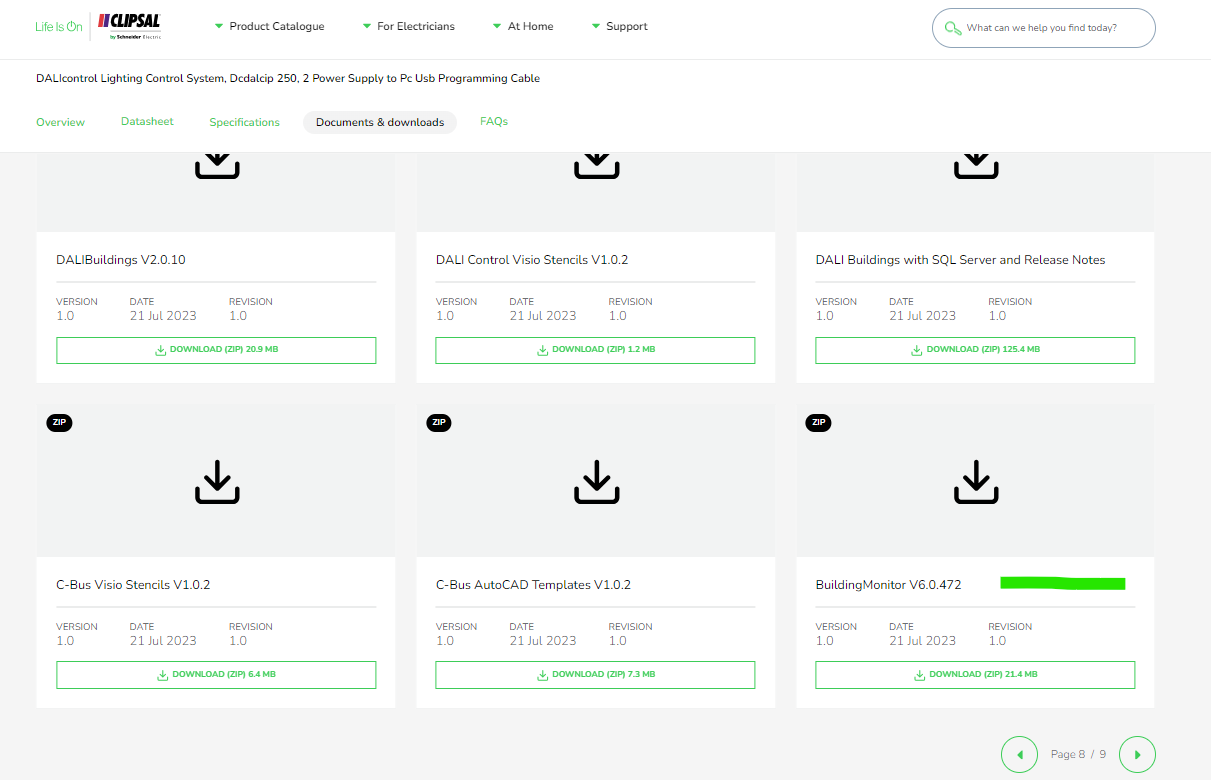
Where to download software for the dali building monitor software package?
Hide Showhttps://download.schneider-electric.com/files?p_Doc_Ref=BuildingMonitor-V6.0.472
Search for DCDALCIP250-2 or DCCABKIT6 in Google

Select document & download and tick software - Release

Click through the pages and look for Building Monitor V6.0.472
DALI broadcasts messaging from the DALI gateway vs DALI broadcasts from a DALI Dual Power Supply via the override Push Buttons
Hide ShowThe differential of the DALI broadcasts messaging from the DALI gateway via a C-Bus Group vs Sending broadcasts from a DALI Dual Power Supply via the Push Buttons on the front of the power supply.
-
Sending broadcasts from the DALI gateway via a C-Bus Group.
-
Sending broadcasts from a DALI Dual Power Supply via the Push Buttons on the front of the power supply.
They're different commands with the same outcome.
Sending broadcast from the DALI gateway via a C-Bus Group use ARC command i.e it come with a fade time before the ARC power level of 254(100%) and 0(Off)

Sending broadcast from a DALI Dual Power Supply via the Push Buttons on the front of the power supply is direct Max and Off

How to change a wrong USB Driver on DCCABKIT6
Hide ShowSuppose the following happens when connecting the DCCABKIT6 cable between Laptop and DALIcontrol Duo Mode 3 Power Supply (DCDALCIP250-2).
In Device Manager find something like
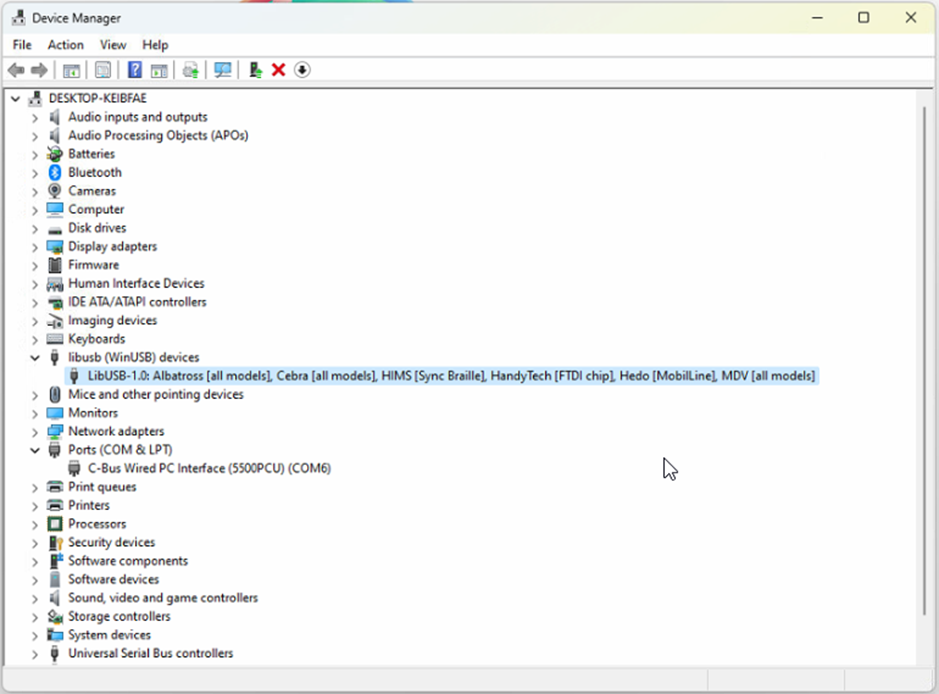
The cable has likely been used with some other product that has recognised the FDTI chip and installed this LibUSB driver which is not recognised by the Simple Wizard which sees a different device ID
BEFORE GOING FURTHER REALISE THAT ONCE COMPLETE THE OTHER DEVICE WILL NO LONGER FIND ITS REQUIRED DRIVER.
Right click on this entry in the Device Manager and select Properties from the menu
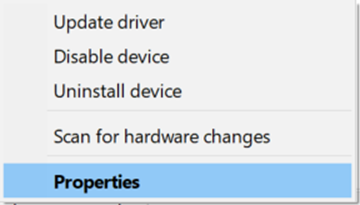
And proceed to the Driver tab

…and select <Update Driver>

… and Select <Browse my computer for Drivers>
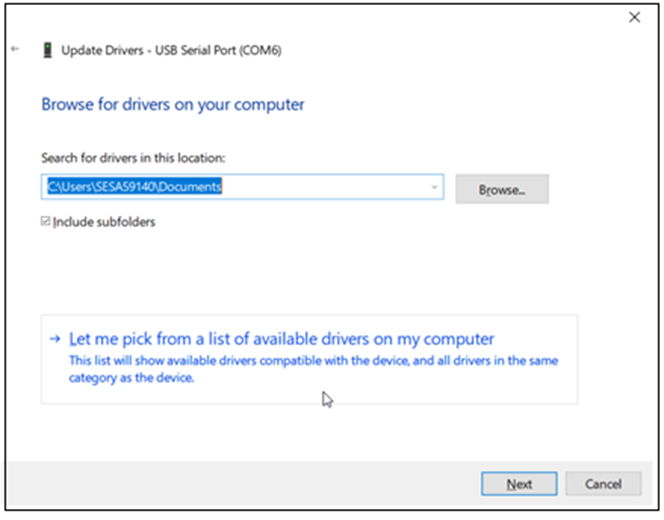
Select <Let me pick from a list of available drivers on my computer>
With this next Dialog un-tick the Show compatible hardware
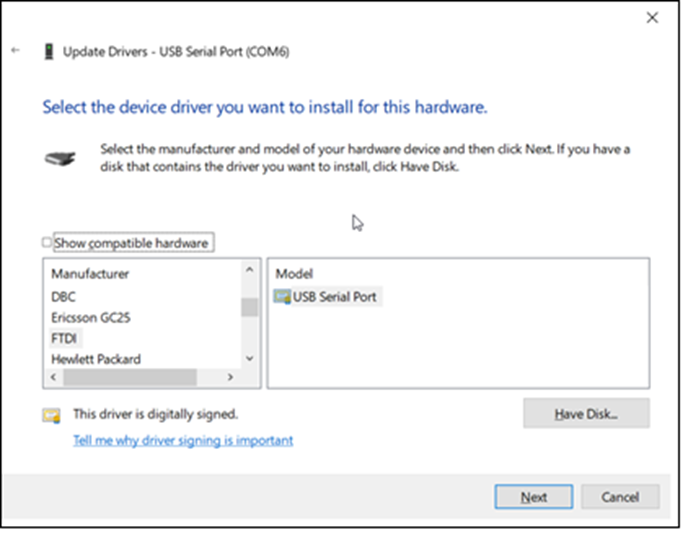
In this case you should see Manufacturer FTDI and Select from the Model USB Serial Port which should start the install finishing with…

From here you should now be able to connect.
It is important to note that when connecting to the DALIcontrol Duo Mode 3 Power Supply (DCDALCIP250-2) with the DCCABKIT6 programming cable and running DCBMWizard or SimpleWizard that the power supply be in mode 1. To achieve this on the DCDALCIP250-2 press and hold the <ON A> button and momentarily press the <TEST A> button. The Line A indicator will single pulse 5x to indicate the mode.
If there is a compatible driver installed you can try tick Show Compatible hardware, then try selecting one of the drivers below.
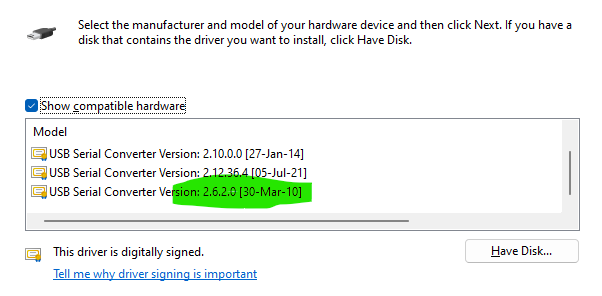
If there are no drivers to be found on the Computer in question it is then possible to download the software by going to the following on your web browser https://support.arduino.cc/hc/en-us/articles/4411305694610-Install-or-update-FTDI-drivers and follow the instructions laid out.
Also go to https://ftdichip.com/drivers/ and follow up with https://ftdichip.com/document/installation-guides/
DCBMWizard, why can I only scan line A on each DALI power supply DCDALCIP250-2 using the DCCABKIT6 programming cable?
Hide ShowConfirmed that DCBMwizard can only connect to LineA
To connect to LineB
1) You can remove LineA and move LineB to LineA. Once commission is completed you can rewire it back.
2) or having a secondary DCCABKIT6 programming cable as line B is powered by line A