Standard Series Single Switch Socket Outlet 250V,10A, Skirt Mount | Cream
Item Number: 16-CM
Datasheet

Specifications
Design
| Range of product | Standard Series |
|---|---|
| Product or component type | switched socket |
| Product brand | Clipsal |
| Surface finish | glossy |
Physical
| Control type | ON/OFF button |
|---|---|
| Number of gangs | 1 gang |
| Pin number | 3 |
| Number of power socket outlets | 1 |
| Actuator |
|
| Fixing mode | by screws |
| Local signalling | without light indicator |
| Mounting position | horizontal |
| [ue] rated operational voltage | 250 V AC |
| [in] rated current | 10 A |
| Depth | 14 mm |
| Length | 98 mm |
| Width | 45 mm |
| Fixing center | 78 mm |
| Standards |
|
| Mercury free | Yes |
| Rohs exemption information | Yes |
| Environmental disclosure | ENVPEP120506EN |
| Eu rohs directive | Compliant By Exemption |
Material
| Material | plastic |
|---|
Documents & downloads
-
All
-
Technical Data Catalogues
-
Specification Guide
-
Declaration of Conformity (Sustainability)

16-BK EU RoHS Directive
VERSION
1.0
DATE
01 Jan 1900
REVISION
1.0
16-BK EU RoHS Directive
VERSION
1.0
DATE
01 Jan 1900
REVISION
1.0
16-CM EU RoHS Directive
VERSION
1.0
DATE
01 Jan 1900
REVISION
1.0
16-CM EU RoHS Directive
VERSION
1.0
DATE
01 Jan 1900
REVISION
1.0
16-RD EU RoHS Directive
VERSION
1.0
DATE
01 Jan 1900
REVISION
1.0
16-RD EU RoHS Directive
VERSION
1.0
DATE
01 Jan 1900
REVISION
1.0
Frequently Asked Questions
What does the 16AX mean on the PDL 681MT16WH
Hide ShowHow to enable the C-Bus Clock or Power Supply of the Voltage Free Relays?
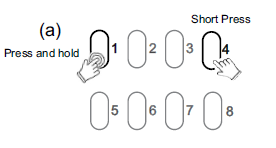
Hide ShowFor any Voltage Free Relay, the C-Bus Clock can be enabled or disabled via the front panel, by pressing and holding down the top left channel button, and short pressing the top channel button second in from the right.
For any Voltage Free Relay, the C-Bus Power Supply can enabled or disabled via the front panel, by pressing and holding down the top left channel button, and short pressing the top right channel button.
Note: By default both the C-Bus Clock and C-Bus Supply are disabled.
Do the Digital Dimmers & Voltage Free Relays support Software Network Burdens?
Hide ShowNo, a software network burden is not a supported feature for the:
Digital Dimmers: 5508D1D or 5504D2D
Voltage Free Relays: 5504RVF, 5508RVF or 5516RVF
Control Expert V16.2 System Requirements
Hide ShowDo you have a double outlet that has each side wired individually?
Hide ShowC2016/2-WE
16/2MF-WE
15/2V-WE
WSC227/1/2-RG
How to enable/disable C-Bus power supply for 5516RVF
Hide ShowThe integrated C-Bus Power Supply can be enabled or disabled via the front panel by performing a short press on the top right channel button whilst holding down the top left channel button to toggle the enabled state.
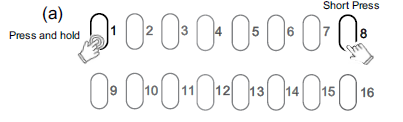
By default, the integrated 200 mA C-Bus Power supply is disabled.
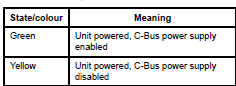
The enabled status of the integrated C-Bus power supply is shown on the Unit indicator.
(Green - Enable, Yellow - Disable).
For 5508RVF and 5504RVF