

Standard Series Flush Plate Architrave Size, Switch Plate 1 Gang (75 x 32mm) | Black
Item Number: 31-BK



Specifications
Design
| Range of product | Standard Series |
|---|---|
| Product brand | Clipsal |
| Product destination | switch |
Physical
| Fixing mode | by screws |
|---|---|
| Marking | without marking |
| Mounting position | horizontal and vertical |
| Fixing center | 55 mm |
| Width | 32 mm |
| Height | 72 mm |
| Depth | 11 mm |
| Number of gangs | 1 gang |
| Mercury free | Yes |
| Rohs exemption information | Yes |
| Environmental disclosure | ENVPEP120506EN |
| Eu rohs directive | Compliant By Exemption |
Material
| Material | plastic |
|---|
Documents & downloads
-
All
-
Technical Data Catalogues
-
Environmental Disclosure
-
Declaration of Conformity (Sustainability)

31-BK EU RoHS Directive
VERSION
1.0
DATE
01 Jan 1900
REVISION
1.0
31-BK EU RoHS Directive
VERSION
1.0
DATE
01 Jan 1900
REVISION
1.0
31-CM EU RoHS Directive
VERSION
1.0
DATE
01 Jan 1900
REVISION
1.0
31-CM EU RoHS Directive
VERSION
1.0
DATE
01 Jan 1900
REVISION
1.0
31-WE EU RoHS Directive
VERSION
1.0
DATE
01 Jan 1900
REVISION
1.0
31-WE EU RoHS Directive
VERSION
1.0
DATE
01 Jan 1900
REVISION
1.0
31-WE EU RoHS Directive
VERSION
1.0
DATE
01 Jan 1900
REVISION
1.0
31-WE EU RoHS Directive
VERSION
1.0
DATE
01 Jan 1900
REVISION
1.0
31-WE REACh Regulation
VERSION
1.0
DATE
01 Jan 1900
REVISION
1.0
31-WE REACh Regulation
VERSION
1.0
DATE
01 Jan 1900
REVISION
1.0
31-WE REACh Regulation
VERSION
1.0
DATE
01 Jan 1900
REVISION
1.0
31-WE REACh Regulation
VERSION
1.0
DATE
01 Jan 1900
REVISION
1.0
Frequently Asked Questions
Why are 9001KM38 listed twice, as resistor and full voltage light modules?
Hide ShowIs the 9001KM38 a resistor type or full voltage type of light module?
Product Line:
Push Buttons and Operator Interface
Environment:
Harmony Pushbuttons
Cause:
Product Features
Resolution:
Both descriptions are accurate. They are both the same device but can be selected by either description depending on the application/preference.
How to preserve previous Harmony HMIGTO5310 Datalogging data during Download
Hide ShowIssue:
Looses previous Datalogging data from Harmony HMIGTO5310 , when trying to do a download to the Harmony HMI.
Product Line:
Harmony HMIGTO5310
Resolution:
Inorder to preserve the data during download , it is recommended to use the below methods ,
1.Use copy data to drive to store the data on a USB drive, as this is a more reliable method.
2.Additionally, you can try downloading via Ethernet(NOT FILE SYSTEM DOWNLOAD):
Please enable the option to retain runtime data in the project,
and do NOT delete runtime data during the download.
Do I need to use any caps or silicone on the mounting screws on the Iconic Outdoor?
Hide ShowWhat size conduit entries can be used with Iconic Outdoor?
Hide ShowI am installing a 2-wire Dimmer, when should I be using a 31CAP or 31LCDA?
Hide ShowThe 31CAP and 31LCDA both have separate uses to resolve issues experienced with 2-wire Dimmers.
The 31CAP should be used when minimum load of the device is not being met, this is usually indicated by the load/light, that is controlled by the dimmer, by glowing when it should be off. Adding the 31CAP will increase the load and prevent the load/light from glowing in the off state. Depending on how far off minimum load you are more than one 31CAP may be required.
The 31LCDA should be used in instances where the load/light is flickering constantly, which indicates an issue with compatibility with the 2-wire dimmer used. The 31LCDA resolves these incompatibilities and flickering should then stop, if the flickering is reduced but still present you may need another 31LCDA to completely resolve. No more than 3x 31LCDA’s should be used on one dimmer.
Why does my 41E300PBUD2SM (Dimmer) leave my light glowing when the dimmer is off?
Hide ShowYou can then connect a 31CAP to increase the loading.
How to trigger a action selector from C-Bus key switch
Hide ShowHow to trigger a action selector from C-Bus key switch
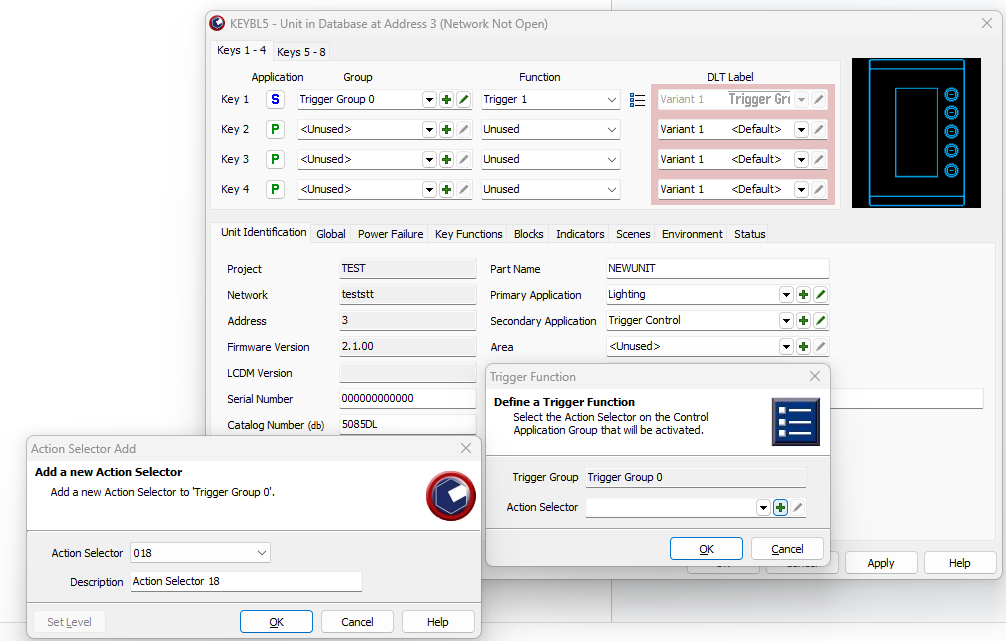
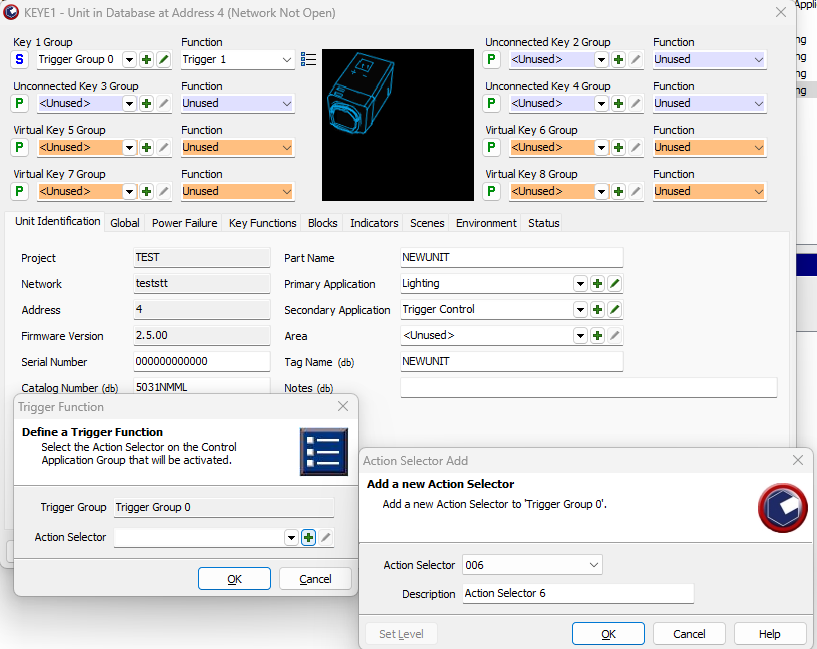
- SELECT TRIGGER CONTROL FROM SECONDARY APPLICATION (UNIT IDENTIFICATION TAP)
- SELECT THE SECONDARY APPLICATION FROM (P) TO (S) FROM THE SELECT KEY
- SELECT THE TRIGGER CONTROL GROUP AND THEN FUNCTION AS TRIGGER 1 OR 2
- SELECT THE THREE DASH TO SELECT THE ACTION SELECTOR
eg.5085DL
eg.5031nmml
How do we use C Bus in Prestige series plates?
Hide ShowIs it a bell press mech and a bus coupler or can you use a 30 series C Bus Master and Slave mech with the bell press mech front end?
The 30 mech adapter provides a led indicator.
The bus coupler plus momentary Prestige button looks better but you lose the led indicator

What is the difference between the 31Cap and 31LCDA?
Hide Show31CAP - Increases minimum load.

For further information please visit https://www.clipsal.com/Trade/Products/ProductDetail?catno=31CAP
31LCDA - Assists with compatibility issues.
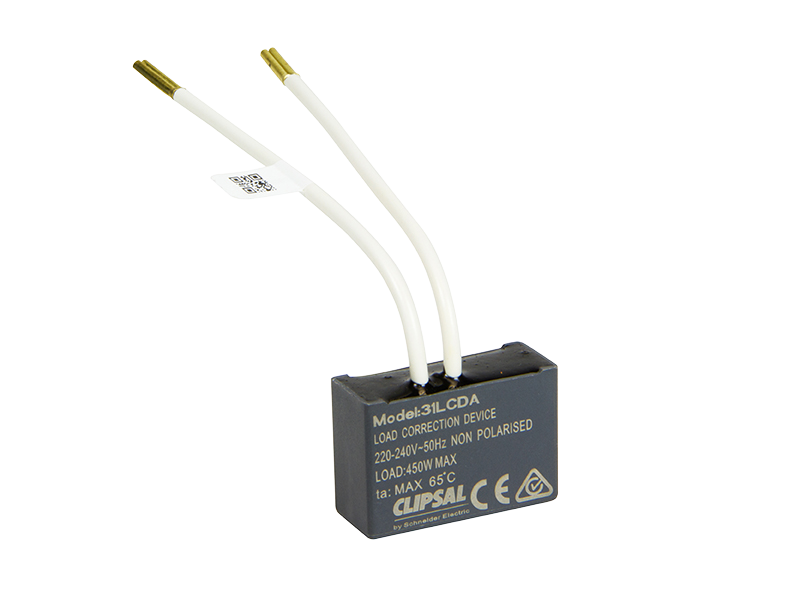
For further information please visit https://www.clipsal.com/Trade/Products/ProductDetail?catno=31LCDA
How do you distribute MAXBAR from the main row to other rows, keeping the system more professional?
Hide ShowWhat is MAXBAR?
Hide ShowThere are Comb busbar for 1P+N and 3P+N applications. There is one variant with neutral terminal block for rows with Main Switch and another variant for rows without Main switch.
How can MAXBAR help me to save time during switchboard installation ?
Hide ShowWhat colours are the new Iconic Outdoor Products available in?
Hide ShowWhat is the breakdown of components for 9001KYK117?
Hide ShowBreakdown of components for 9001KYK117
Product Line:
Harmony Push Buttons
Environment:
Harmony Control Stations
Cause:
Product Features
Resolution:
9001KYK117 components are:
1-9001KY1S1 (red enclosure)
1-9001K15 (break glass operator)
1-9001KA1 (1 open and 1 closed contact)
1-9001KN799RP (legend plate)
Replacement glass discs are 9001K57 (package of five)