Browse all
Browse all

Clipsal - Max 4 Pad lock device Suitable for MAX4 circuit breakers switches & RCDs Suits padlocks with shafts up to 6mm

Clipsal - Max 4 Pad lock device Suitable for MAX4 circuit breakers switches & RCDs Suits padlocks with shafts up to 6mm

Item Number: 4LD

Datasheet
Barcode

Qty UoM EAN Colour
-
-
-

Specifications

Design

Range of product Power
Product brand Clipsal
Product or component type padlocking device

Physical

Mercury free Yes
Rohs exemption information Yes
Environmental disclosure ENVPEP2410044EN
Reach regulation Reference contains Substances of Very High Concern above the threshold
China rohs regulation Product out of China RoHS scope
Eu rohs directive Compliant By Exemption
California proposition 65 WARNING: This product can expose you to chemicals including: Lead, which is known to the State of California to cause cancer and birth defects or other reproductive harm. For more information go to www.P65Warnings.ca.gov

Others

Average percentage of recycled plastic content 0 %
Outside of Europe
Warranty duration(in months) bmecat 18
Weee label N/A
Weee applicability Finished product
Package 1 bare product quantity 1
Legacy weee scope In
Unit type of package 1 PCE
Number of units in package 1 1
Package 1 height 0.8 cm
Package 1 width 6.0 cm
Package 1 length 10.0 cm
Package 1 weight 5.0 g
Green premium status for reporting Green Premium product
Total lifecycle carbon footprint 0.1 kg CO2 eq.
Carbon footprint of the manufacturing phase [a1 to a3] 0.030299420675476155
Carbon footprint of the manufacturing phase [a1 to a3] 0 kg CO2 eq.
Carbon footprint of the distribution phase [a4] 0.002224022466510394
Carbon footprint of the distribution phase [a4] 0 kg CO2 eq.
Carbon footprint of the installation phase [a5] 0.00001255685776927623
Carbon footprint of the installation phase [a5] 0 kg CO2 eq.
Carbon footprint of the use phase [b2, b3, b4, b6] 0.018562011096995117
Carbon footprint of the use phase [b2, b3, b4, b6] 0 kg CO2 eq.
Sustainable packaging Yes
Carbon footprint of the end-of-life phase [c1 to c4] 0.012770134953120961
Carbon footprint of the end-of-life phase [c1 to c4] 0 kg CO2 eq.
Pvc free Yes
Halogen-free status Halogen free product
Silicone-free  Yes
Take-back No
Product contributes to saved and avoided emissions No
Removable battery N/A
Total lifecycle carbon footprint 0.0638681460498719
Average percentage of recycled metal content 0 %
Packaging made with recycled cardboard Yes
Packaging without single use plastic Yes
Halogen-free status Halogen free product
Pvc free Yes
Silicone-free Yes
End of life manual availability N/A
Take-back No
Warranty (in months) 18

Frequently Asked Questions

How to set a Static or Fixed IP, for 5500CN2 C-Bus Network Interface

Hide Show
Below is the step to take to change the IP address of the 5500CN2

1

Assuming that it's powered up and connected to the same network where your PC is connected to.

Assuming that you have installed Toolkit software where C-Bus Control System IP Utility is also installed.

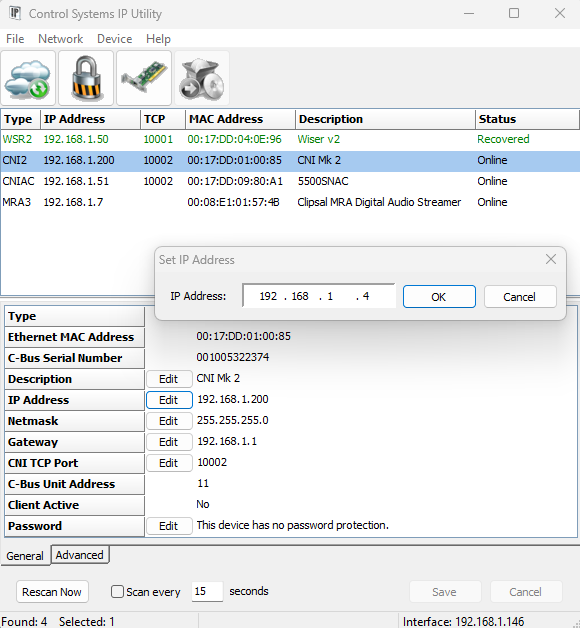
  1. From start menu run the C-Bus Control System IP Utility
  2. Select the Cloud Icon to scan for C-Bus network interface
  3. Select the C-Bus network interface you wish to specify the static IP address for
  4. Select the edit button and type the desired static IP address and click ok
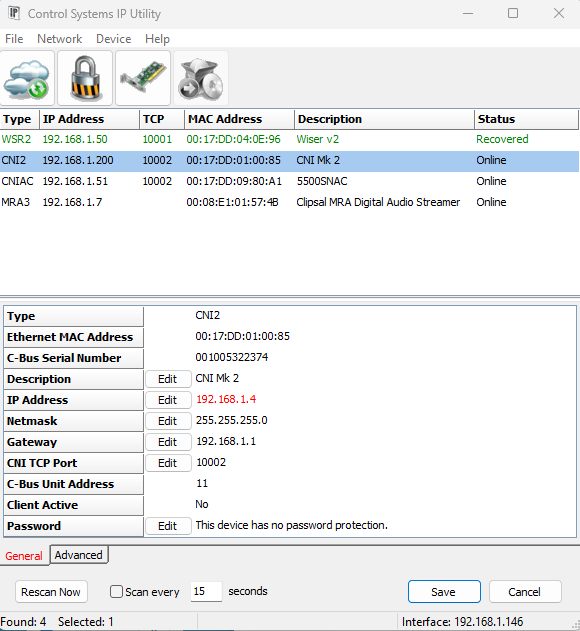
  5. The new IP address will be showing in red
  6. Hit the save button will apply the change and the C-Bus network interface will reboot and shall now have the new IP address
2   3